
Updated October 27, 2026 · By Shivam Das
If you have several Roblox codes to test, the fastest approach is not to jump between random code pages, videos, and game menus after every attempt. First sort the codes by what they belong to, open the correct official redemption destination, and process one small batch at a time. That keeps the routine quick while reducing the chance of entering a code on the wrong page or redeeming a reward on the wrong account.
Quick answer: keep a short checklist of codes and their source, sign in to the correct Roblox account once, use the official Roblox redemption page for supported gift-card and virtual-item codes, and submit each code separately. Codes for individual experiences may need to be entered inside that game instead. Roblox’s official guidance says to enter a code accurately, select Redeem, and look for the success message; it does not provide a universal bulk-submit box.
This guide focuses on a repeatable workflow, not a promise that every code circulating online is active. Promo codes can expire, and a page’s “updated today” label is not proof that every code on it was tested today.
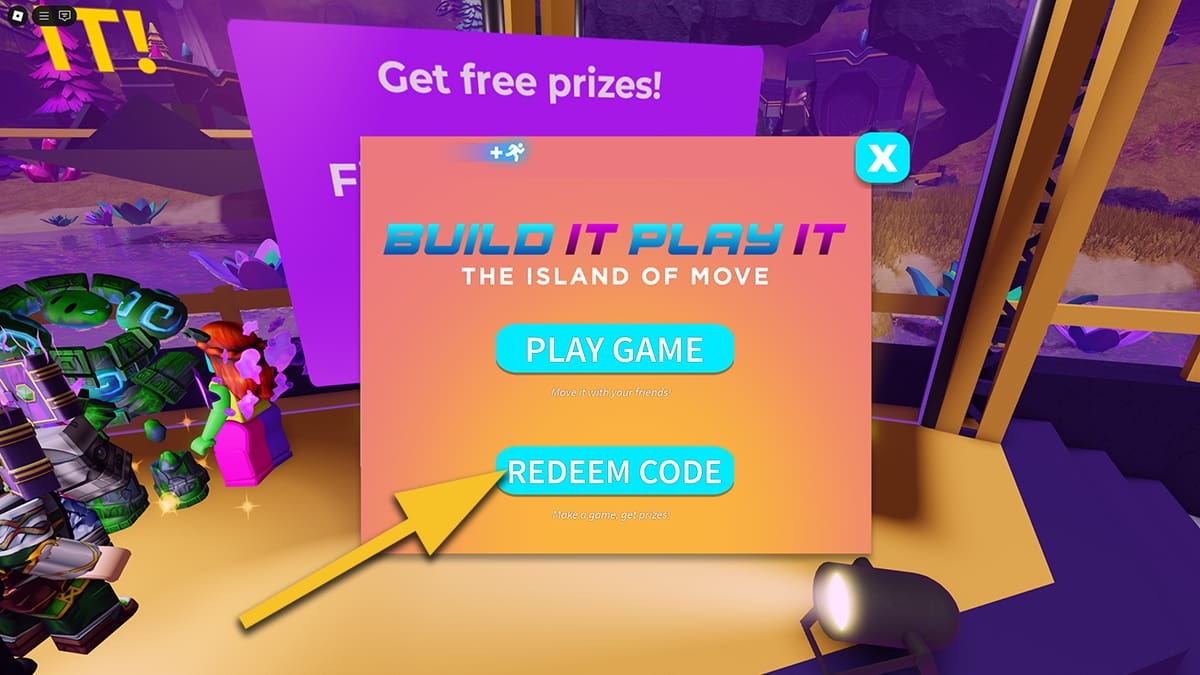
Table of Contents
- The fastest low-switching workflow
- Sort codes before redeeming
- Use the official page for supported codes
- Handle game-specific codes separately
- A 5-minute batch checklist
- Fix common code errors quickly
- Avoid fake code lists and generators
- Frequently asked questions
The Fastest Low-Switching Workflow
There is no official bulk-redemption feature that submits a whole list of unrelated codes in one click. The practical time-saver is to reduce unnecessary navigation and make fewer avoidable mistakes. Use this sequence whenever you collect several new codes.
- Collect first, redeem second. Put the codes in a temporary note with the source and reward type. Do not keep leaving the redemption page to search for the next code.
- Label each code. Use simple labels such as “Roblox website,” “gift card,” or “specific game.” If you cannot tell where a code came from, verify the publisher’s instructions before trying it.
- Choose the right account. Sign in before entering anything and double-check the username. A reward redeemed on the wrong account may not be transferable.
- Open the correct destination. Use the official Roblox redemption page for codes that Roblox says are supported there. For an experience-specific code, open the exact game and follow its developer’s instructions.
- Submit one code at a time. Wait for the result message before moving to the next one. Record “success,” “already owned,” or “failed” so you do not keep repeating the same attempt.
- Verify the reward once per batch. Check the relevant inventory category or account balance after the redemption attempts. A cosmetic item may appear under a specific accessory category rather than as a pop-up in the game.
This order minimizes switching because you do the research and sorting up front, then finish each category in one pass. It also avoids a common mistake: assuming that every string labeled “Roblox code” belongs in the same place.
Sort Codes Before Redeeming
Before opening a new tab, identify the kind of code you have. Roblox uses several code-related flows, and individual experience developers can create their own in-game redemption systems.
| Code type | Where to start | Fastest safe habit |
|---|---|---|
| Roblox promo or supported virtual-item code | Official Roblox redemption page | Sign in once, enter each code separately, and record the result. |
| Roblox gift card or credit code | Official Roblox redemption page | Check the account first; gift cards must be entered one at a time. |
| Code for a specific Roblox experience | The experience’s official page or developer instructions | Keep these in a separate list and redeem inside the named game if required. |
| Unverified code from a random video or comment | Verify with the developer or a credible source first | Do not spend time trying it until its source and destination are clear. |
Roblox Support explains the website redemption process for promo codes, while its gift-card guidance explicitly says multiple gift cards can be redeemed but must be entered one at a time. That means a “bulk code redeemer” promising to process dozens of codes simultaneously is not the official workflow.
Use the Official Page for Supported Codes
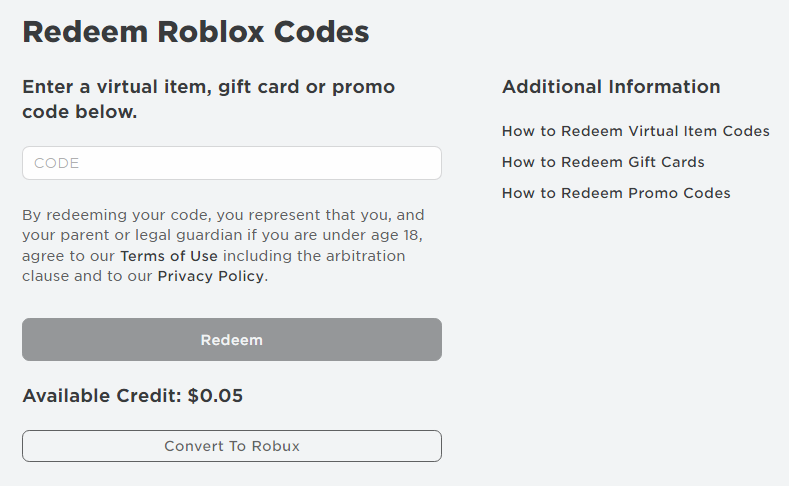
For codes Roblox directs you to redeem on its website, follow these steps:
- Open roblox.com/redeem directly.
- Log in to the account that should receive the item, credit, or other eligible reward.
- Check the displayed account name before submitting the first code.
- Copy one code from your prepared list and paste it into the field. Avoid copying extra spaces or explanatory text.
- Click Redeem and wait for the on-screen response.
- Mark the result in your note, clear the field if needed, and continue with the next code.
Roblox’s support instructions say that a success message appears after a promo code is successfully redeemed. If a code fails, check the spelling and account first, then check whether the item is already in your inventory. Do not assume every failure means the code expired.
Official help pages: How Do I Redeem a Promo Code? and How to Redeem and Spend Your Gift Card.
Handle Game-Specific Codes Separately
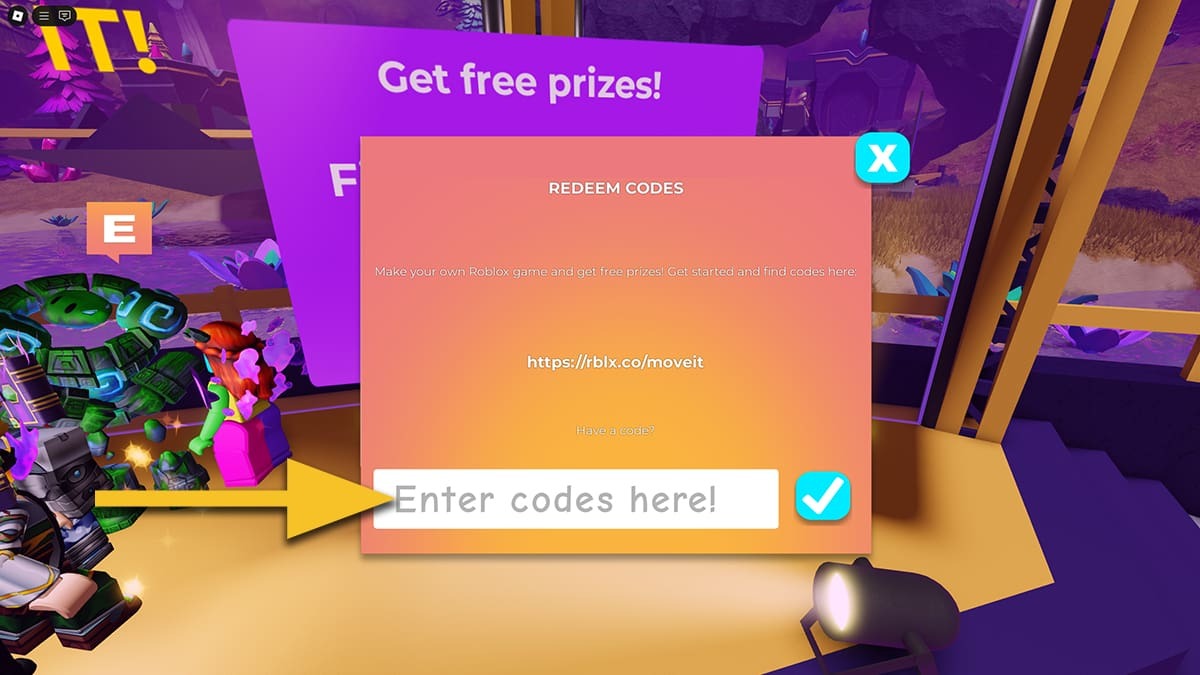
Some experiences use their own code buttons, booths, or menus. These are not interchangeable with Roblox’s website redemption flow. For example, guides to Island of Move show a dedicated “Redeem Code” menu, while Mansion of Wonder has had an in-game code interface of its own. The screenshots below are examples of those historical interfaces—not confirmation that every old code for those experiences still works today.
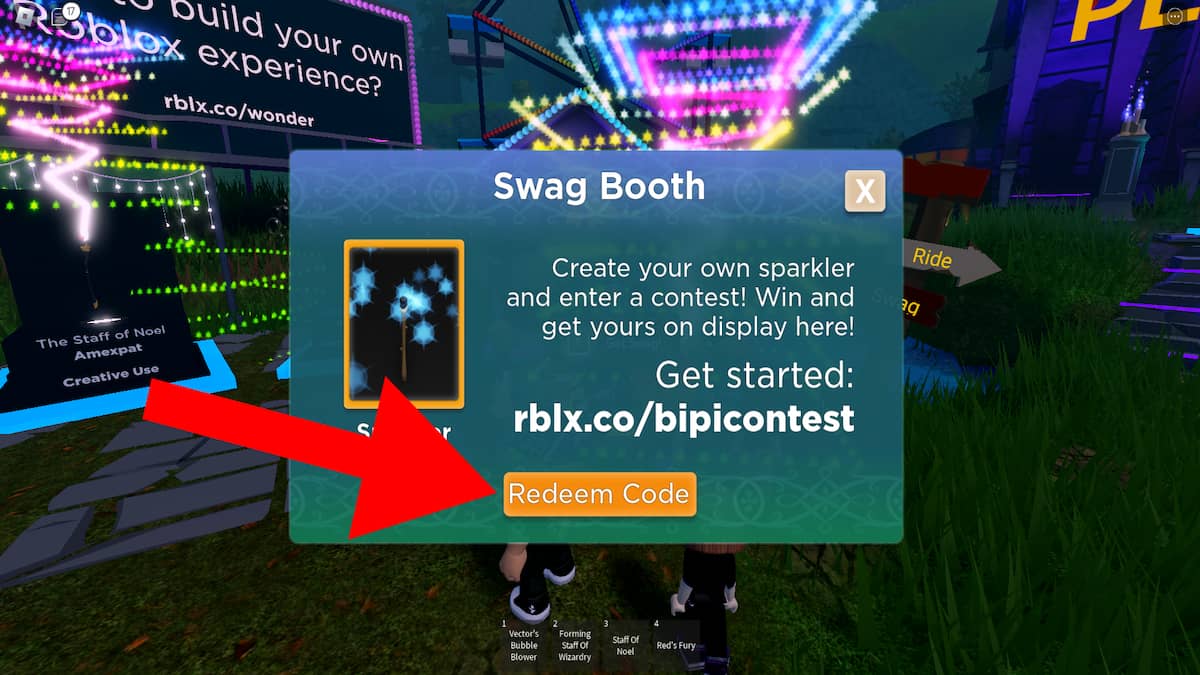
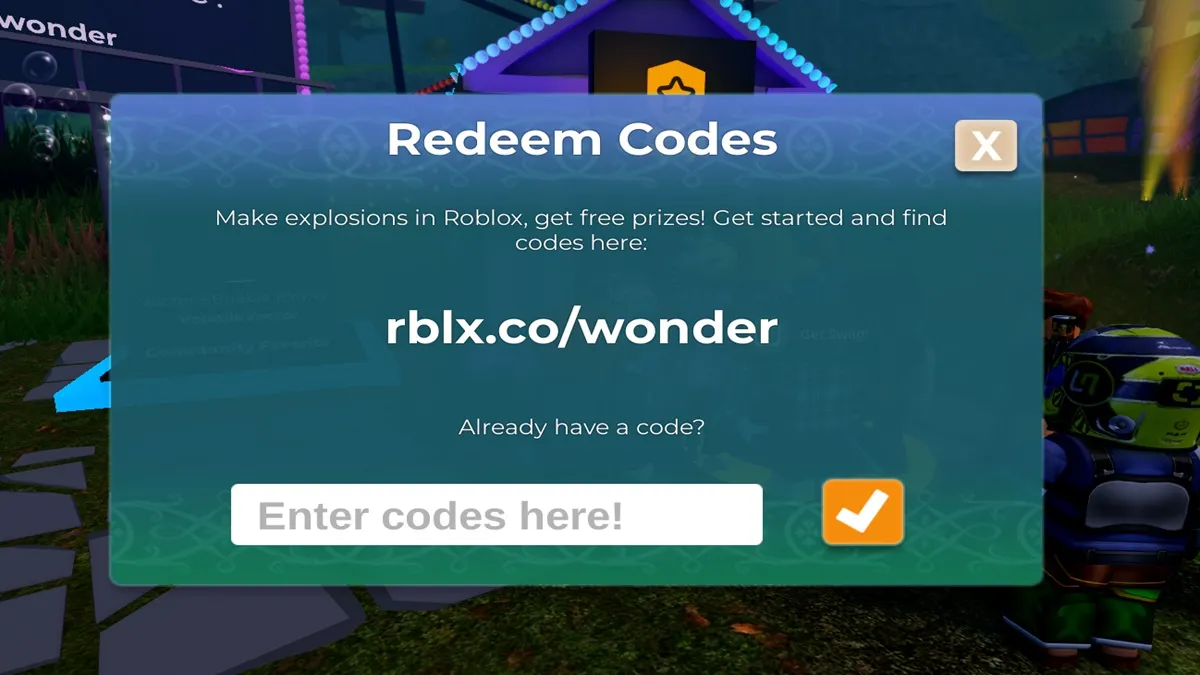
Because older game-code lists can remain online long after a promotion ends, verify the experience’s creator and the date of the source. If a code is described only in an old article, do not automatically classify it as working in October 2026.
A 5-Minute Batch Checklist
Use this lightweight checklist whenever you have several codes ready. The five-minute target is a workflow goal, not a guarantee: slow page loads, account verification, or unfamiliar game menus can take longer.
- Minute 1 — Sort: group codes by destination and note the source beside each one.
- Minute 2 — Verify: remove duplicates and discard entries with no credible source or unclear instructions.
- Minute 3 — Sign in: open the official destination and confirm the correct account.
- Minute 4 — Redeem: submit each code separately and record the result immediately.
- Minute 5 — Check: inspect the relevant inventory or account balance, then save the results so you do not retry completed codes.
A simple note can use this format: CODE — source — destination — result — date checked. Never store your password or sensitive account details in that note. Keep only the code and the result you need to avoid repeated work.
Fix Common Code Errors Quickly
The code says invalid
Check for typos, extra spaces, the correct account, and the correct redemption destination. Roblox Support also recommends checking whether the item is already in your inventory. If all of those checks are correct, the code may have expired or may not be valid for your account.
The code works for someone else but not for you
That does not prove your account is broken. The code may have been single-use, account-specific, already redeemed, or no longer active. Confirm the official terms before trying more lists.
You cannot find a redeem button in the app
Roblox’s gift-card guidance says redemption is generally handled in a web browser; it notes a specific in-app option for Samsung Galaxy devices. If you cannot find the feature in the standard app or on a console, switch to a browser and follow the official instructions.
You received the item but cannot see it
Open the correct inventory category and confirm that you are checking the same account used for redemption. Some rewards are accessories or other virtual items, not a visible balance change.
Avoid Fake Code Lists and Generators
Fast redemption should never mean handing account access to a third party. Avoid sites that ask for your Roblox password, promise secret free Robux, require an extension or download, or demand a survey before revealing a code. Do not give away a gift-card PIN to someone claiming they need to “test” it.
Roblox’s official gift-card page warns users about scams and says offers of free Robux codes are not legitimate. Use the official Roblox redemption page and Roblox gift-card information for account-related redemptions.
For more context on checking code status, read our related guide to codes reported as expired and our Roblox codes verification guide. Code status can change, so use current sources and the redemption result rather than trusting a recycled list.
Frequently Asked Questions
Can I redeem multiple Roblox codes at once?
Roblox’s official website workflow has you enter a code and select Redeem. Its gift-card guidance says multiple gift cards can be redeemed, but each must be entered one at a time. There is no universal official bulk-submit box for unrelated codes.
What is the fastest way to redeem several codes?
Collect and sort codes first, sign in to the right account once, use the correct destination for each category, submit codes one by one, and record the result immediately. That reduces unnecessary tab switching and repeated attempts.
Do all Roblox codes go to roblox.com/redeem?
No. Roblox supports certain promo, gift-card, and virtual-item redemptions through its website, but codes for individual experiences may need to be entered inside the game. Follow the instructions from the code’s official source.
Why should I record each code’s result?
A short record helps you avoid submitting the same code repeatedly, separates expired or invalid codes from already-claimed rewards, and makes the next batch faster.
Can a Roblox code generator redeem codes for me?
Do not trust third-party code generators that request your password, ask you to download software, or promise free Robux. Use Roblox’s official redemption process and the specific experience’s official instructions.
Why does a code fail even though a website says it is active?
The list may be outdated, the code may belong to another experience, you may have already redeemed it, or the code may have expired. Check the source date and destination, then follow Roblox’s troubleshooting advice.
Can I redeem codes from a phone?
You can use a mobile web browser to visit the official redemption page. Roblox’s gift-card support also documents a redemption option in the Samsung Galaxy app; availability differs for the standard app and consoles.
Editorial note: This guide explains a time-saving process and does not claim that every code circulating online is active. Code status is best confirmed through the official source and the redemption response.







