U.S. Roblox player guide · October 29, 2026 · By Shivam Das
Quick answer: If The Hollow shows Floor 8 as complete but the Rotten Pumpkin badge is missing, do not immediately repeat the whole puzzle. First check the badge on the same Roblox account, separate badge ownership from the avatar-item claim, reopen the hub’s badge redemption panel, and rejoin one fresh server. Save screenshots before trying again. These are safe troubleshooting checks—not a guaranteed repair. Roblox developers are investigating reports of floor badges failing to award even when a floor appears complete.
Evidence matters tonight: an October 29 Roblox Developer Forum report describes completed floors that did not award badges, but the player’s documented examples were Floors 1 and 2. Earlier reports describe a similar floor soft-lock. This is evidence of a wider The Hollow badge-registration problem, not proof that every Floor 8 player is affected or that Floor 8 has a confirmed unique bug.
What is the Floor 8 badge?
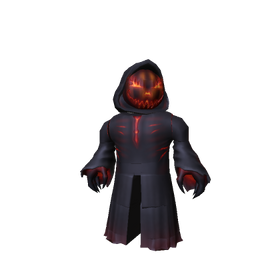
Floor 8 is associated with The Overseer, the WARDEN monster in The Hollow’s Halloween event. Third-party event trackers identify the Floor 8 reward as the Rotten Pumpkin badge and avatar accessory. Current walkthroughs describe a pedestal-object puzzle involving five objects. Roblox’s public event announcement confirms the event and rewards, but not this detailed walkthrough. Treat the route below as reported guide information, not an official Roblox instruction.
First, identify exactly what failed
Badge registration and avatar-item delivery are separate checkpoints. The floor can look solved while the badge is absent; the badge can be on your profile while the cosmetic still needs to be claimed at the hub.
| What you see | What to inspect |
|---|---|
| Floor 8 looks complete, but Rotten Pumpkin badge is not on your profile | Badge-award or account-sync step |
| Badge is on your profile, but the accessory is missing | Hub redemption or item-claim step |
| Badge and item appear, but the hub still shows locked | Hub refresh or reward-panel state |
| Floor is complete and cannot be replayed, but badge is missing | Possible floor soft-lock; document and report it |
Five safe checks to try tonight
1. Check the Rotten Pumpkin badge on the correct account
Open the Roblox profile for the account you used in The Hollow and look for the exact Rotten Pumpkin badge. Make sure you are not checking an alternate account or a different badge with a similar Halloween name. A solved puzzle, green elevator indicator, or completed-floor label is not by itself proof that Roblox awarded the badge.
If the badge is absent, record that before doing anything else. If it is present, skip to the hub claim check; replaying the floor may not solve an item-delivery issue.
2. Reopen the official hub’s badge redemption panel
Return to the official The Hollow experience and look for the current Redeem Badges or badge-redemption control. Check the Rotten Pumpkin row and its live status. Do not confuse the badge panel with the shop or a participating-game visit list. If the badge is shown as redeemable, follow the on-screen prompt once and note what happens.
3. Leave and rejoin one fresh server
Exit The Hollow completely, return to Roblox, and launch the official hub again. Reopen the badge panel and check your floor status. A fresh server can refresh the view of event progress, and Roblox staff have suggested rejoining in a related public report. However, this is only a low-risk check: public reports do not establish that it repairs every missing badge or restores every soft-locked floor.
4. Confirm the Floor 8 objective reached its final step
Third-party Floor 8 guides report a puzzle with five objects—Candle, Skull, Bottle, Lantern, and Bell—and matching glowing pedestals. The reported sequence is to carry each object to its matching pedestal, avoid The Overseer, collect the relic after the final placement, and return it to the elevator. If your run ended before the relic-return step or final completion state, the objective may not have reached the badge-award checkpoint.
This walkthrough is not an official guarantee. If the floor already shows complete and cannot be restarted, do not keep repeating unrelated steps; capture the state and report the mismatch.
5. Check the accessory separately in your avatar inventory
If Rotten Pumpkin is visible among your Roblox badges, inspect your avatar inventory for the accessory. Check the correct head/accessory category and confirm you are signed into the same account. If the hub shows a separate claim button, use it once and note whether the game confirms delivery. A badge does not necessarily mean every related item has already appeared in inventory.
When the floor is soft-locked: stop and collect evidence
A concerning pattern in public reports is a floor that appears solved—its pieces or pillars are already in place—while the badge is missing and the game will not allow another attempt. A player reported this behavior on October 24, and a follow-up report on October 29 described missing floor badges despite completion. In the October 29 thread, a Roblox representative said the issue would be investigated and expressed hope that the cause could be identified and patched. The reply also said the player’s data was not lost.
If your Floor 8 state matches that pattern, take screenshots of:
- The elevator showing Floor 8 as complete.
- The solved puzzle or final floor state.
- Your Roblox profile showing whether the Rotten Pumpkin badge is present.
- The hub’s badge redemption panel and its status.
- Your avatar inventory if the badge is present but the accessory is missing.
Write down your approximate completion time, time zone, device, Roblox username, and exact steps. Never post passwords, email codes, backup codes, browser cookies, or account session details.
Where to report the problem
Use the relevant Roblox Developer Forum report about floor badges not being awarded to check for updates or add a concise reproduction report. You can also use Roblox Support for an account-specific issue. Include the floor number, badge name, completion time, screenshots, and whether the badge is visible on your profile.
Do not pay a third party to “force” a badge, install an executor or claim tool, or give anyone account credentials. Badge grants are handled by Roblox and experience-side systems; an external tool cannot safely guarantee repair.
What is confirmed—and what is not
- Confirmed: The Hollow is a floor-based Halloween event with an official Roblox experience and event announcement.
- Confirmed as public reports: Players have reported completed floors where the expected badge was not awarded, including a follow-up report dated October 29.
- Confirmed response: A Roblox representative replied in the October 29 report that the issue would be investigated and that the player’s data was not lost.
- Not confirmed: That every Floor 8 player is affected, that one universal fix exists, or that rejoining will restore every missing badge.
- Not confirmed: That a missing badge automatically means the Rotten Pumpkin accessory is permanently lost.
Frequently asked questions
Is the Floor 8 Rotten Pumpkin badge bug confirmed?
There are public reports of floor badges failing to award after completion, but the October 29 report’s examples were Floors 1 and 2. That supports concern about a broader badge-award issue; it does not independently confirm a Floor 8-only bug.
Will rejoining The Hollow fix a missing badge?
It may refresh the hub’s view and is a sensible low-risk check. It is not guaranteed. Check your profile again after one fresh-server join and preserve screenshots if the badge remains missing.
Should I replay the Floor 8 puzzle?
Only consider replaying if the objective clearly did not complete and the game allows a fresh attempt. If the floor is already marked complete, cannot restart, and the badge is absent, document the possible soft-lock and report it instead of repeating the same route.
What if I have the badge but not Rotten Pumpkin?
Check the hub’s reward panel for a separate claim action, then inspect your avatar inventory. If the item still does not appear, report badge ownership and the missing-item state separately.
Is there a code to claim the missing badge?
No verified code or public code-entry method has been established for forcing the Floor 8 badge. Avoid sites or players promising a secret claim code in exchange for account access.
Deadline reminder
Roblox’s event announcement says The Hollow rewards remain collectible until November 2, 2026, at noon Pacific Time. The finale and the final reward-collection cutoff are not the same moment. If your badge or item is missing, collect evidence and report it early rather than waiting until the final hours.
Sources
- Roblox Newsroom — The Hollow Halloween survival event (official event details and collection deadline).
- The Hollow — official Roblox experience.
- Roblox Developer Forum — Badges for floors still not awarded despite completion (October 29 report and developer response).
- Roblox Developer Forum — Floors soft-locking players from getting items in The Hollow (earlier player report).
- The Hollow Floor 8 puzzle guide (third-party walkthrough; reported steps, not Roblox-confirmed instructions).
Editorial note: Independent reporting by Shivam Das. Player reports are identified as reports, not universal platform findings. Troubleshooting steps are safe checks, not guaranteed fixes. This article is not affiliated with or endorsed by Roblox.