For U.S. Roblox players · Updated October 29, 2026 · By Shivam Das
Quick answer: If The Hollow’s Floor 7 chase stutters on your phone, switch Roblox graphics to Manual (if available), lower quality a few steps, close demanding background apps, keep the device cool, and test one fresh server. Change one setting at a time to tell frame-rate stutter apart from network delay or a game/server issue. These are troubleshooting steps—not an official Floor 7 bug fix or a guaranteed “best” preset.
Roblox’s official Halloween announcement describes The Hollow as a nine-monster survival event, with a live finale planned for October 31 and rewards available until noon Pacific time on November 2. The announcement does not confirm a Floor 7 mobile-lag incident or publish a special Night 8 graphics preset. This guide separates official facts from practical tests players can run themselves.
First, identify what “lag” means during a chase
Lowering graphics can help if frames are dropping, but it usually will not repair a slow connection. Roblox Support separates lag into different categories, so start by matching the symptom:
- Choppy or frozen-looking movement: likely graphics or device-performance trouble. Test lower graphics quality and close heavy apps.
- Other players snap around or actions register late: likely network latency. Check Wi-Fi or cellular stability and compare another server.
- The room or effects appear late: loading or asset delays may be involved. Give the scene a moment to load before sprinting into the chase.
- Only one Floor 7 server behaves badly: try one different server. If other Roblox experiences run smoothly, do not assume your whole phone is the cause.

Best mobile settings to test before another Floor 7 run
1. Set graphics to Manual and lower quality gradually
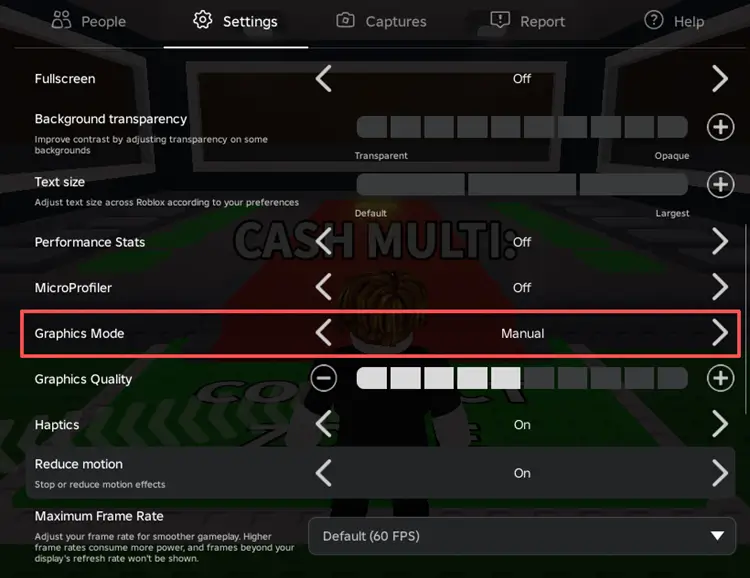
Open the Roblox in-experience menu, choose Settings, and look for Graphics Mode. If it is set to Auto and the app offers Manual, switch to Manual and move Graphics Quality down several steps. Start around the lower-middle range rather than copying a universal number: phones differ in chip, screen resolution, cooling, and battery mode. Replay the same short stretch, then raise quality one step at a time if movement stays smooth.
2. Keep the chase readable, not pretty
For a chase, consistent movement and a clear view are more useful than maximum visual detail. If lower graphics smooths the camera, keep that setting for the run. If the picture remains smooth but doors, pickups, or interactions respond late, return to connection checks instead of lowering graphics repeatedly.

3. Close apps that compete for memory or bandwidth
Before joining, pause large downloads, cloud backups, video streams, screen recording, and other demanding apps. Close unused apps if the phone is struggling. Avoid repeatedly force-closing Roblox in the middle of a run; do a clean restart only if the client is already frozen or behaving abnormally.
4. Reduce heat and battery pressure
A phone that has become hot may reduce performance to protect itself. Let it cool, avoid direct sunlight, and try unplugging it if charging makes it unusually warm. If your device has a battery-saver mode that limits performance, compare a short run with that mode off—provided you have enough battery and the phone remains at a safe temperature.
5. Stabilize the connection before chasing ping “boosters”
Use reliable Wi-Fi where possible, move closer to the router, or compare cellular data if your signal is strong. Do not switch networks halfway through a chase. Avoid third-party “ping booster” downloads that promise guaranteed results or ask for your Roblox password, verification code, or session cookie.

A two-minute test that helps isolate the cause
- Take note of the device, connection (Wi-Fi or cellular), and whether the phone feels hot.
- Run the same short section once using your current settings.
- Lower graphics quality several steps and repeat the same section without changing networks.
- If visuals improve, keep the lower setting for the chase. If interactions still lag while the image is smooth, compare one different server or connection instead.
- If the issue persists across experiences, check the official Roblox Status page and the device/network. If it happens only in The Hollow, record the approximate time, server/experience, device model, and exact symptom for a useful report.
What is confirmed about Night 8—and what is not
Roblox’s official announcement confirms The Hollow’s event structure and the October 31 finale, but it does not document a universal mobile-only Floor 7 chase bug, a server-capacity incident, or a guaranteed graphics preset. Player reports can flag a pattern, but one clip or one slow server cannot prove that all mobile players are affected. This article therefore offers repeatable troubleshooting rather than claiming an unverified fix.
For event timing and the reward deadline, read the official Roblox The Hollow announcement. For general graphics and network troubleshooting, consult Roblox Support’s lag guide and the Roblox Status page.
Frequently asked questions
What graphics setting is best for Floor 7 chases on mobile?
There is no verified setting that is best for every phone. If frames stutter, try Manual graphics and lower quality several steps, then test the same section. Raise quality gradually only if the run remains smooth.
Will lowering graphics fix high ping?
Not usually. Lower graphics mainly targets visual or frame-rate stutter. If actions respond late or other players teleport, test a stable connection and a different server.
Is a Floor 7 mobile-lag bug officially confirmed?
The public Roblox event announcement checked for this article does not confirm a widespread Floor 7 mobile-lag incident. Treat individual reports as unverified until Roblox or repeatable evidence establishes a broader issue.
Should I reinstall Roblox before Night 8?
Not as the first step. Try graphics, connection, heat, and background-app checks first. Reinstalling can take time and may not help if the cause is server-side or network-related; make sure you know your sign-in details before any reinstall.
When do The Hollow rewards end?
Roblox says players can continue collecting event rewards until noon Pacific Standard Time on November 2, 2026. The live finale is planned for October 31.
Reporting note
This guide was checked against Roblox’s official event announcement and support guidance on October 29, 2026. The five images are contextual reference visuals from Roblox-related pages; none is represented as a verified screenshot or proof of a current Floor 7 bug. Settings and results vary by device, operating system, network, and server.