By Shivam Das | Updated October 27, 2026
Minecraft Java Edition 26.4 Snapshot 5 is easy to summarize as the Packed Ice Bricks update. The new brick set is the headline feature, but the snapshot also changes ambient sound behavior, adds an experimental Windows presentation option, adjusts world-generation logic, updates data-pack conventions, and changes how multiplayer login options are negotiated.
Those quieter changes may be more consequential for technical players, mapmakers, server administrators, and anyone who spends hours tuning a world. This guide separates the confirmed Java Snapshot 5 changes from features that belong to the separate Bedrock Preview track. The details below are based on Mojang's official Minecraft 26.4 Snapshot 5 notes and the Minecraft Feedback changelog.
Quick answer: the five changes worth watching
- Ice ambience: regular Ice can emit a sound when a specific surrounding-block arrangement is present.
- Experimental Windows display option: “Prefer DXGI Present” may improve variable refresh rate support, IME behavior, and fullscreen alt-tabbing on compatible hardware.
- World-generation rule handling: ore and scattered-ore blocks discarded because of air exposure no longer fall through to the next replacement rule.
- Data-pack and tag maintenance: data-pack version 125.0 and resource-pack version 100.2 accompany changes to several entity and biome tags.
- Multiplayer login negotiation: servers must explicitly apply encryption and compression options, with the client acknowledging the change.
1. Ice blocks can now add subtle ambient sound to builds
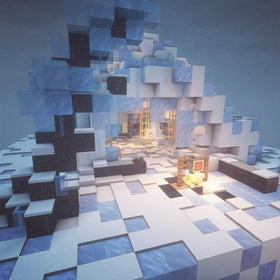
Snapshot 5 adds ambient sounds to regular Ice blocks, but the effect is conditional rather than a sound that plays from every block. Mojang says an Ice block has a chance to emit a sound when it is surrounded by at least eight Ice blocks in all horizontal directions—east, west, north, and south—with one Air block above it and one Water block below it.
For builders, this is a small detail with a useful design implication: a frozen lake, enclosed ice chamber, or carefully layered underwater ice feature may feel more atmospheric without redstone clocks or command blocks. The block arrangement matters, so a decorative ice wall by itself should not be assumed to trigger the effect.
Practical test: in a backup copy of a Snapshot 5 world, create a compact test area with the specified Ice neighbors, Air above, and Water below. Listen for the sound over several attempts; “a chance to emit” does not mean it will play continuously or on demand.
2. “Prefer DXGI Present” is an experimental Windows-only setting
The new “Prefer DXGI Present” video option attempts to use DirectX to present the game. Mojang marks it experimental, leaves it off by default, and notes that support depends on the player’s hardware. The listed potential benefits include improved input method editor (IME) support, better variable refresh rate support, and faster alt-tabbing while playing fullscreen.
This is not a universal FPS boost, and it is not a graphics-quality setting. If your game already feels stable, there is no reason to assume enabling it will improve performance. If you play on Windows and regularly switch between Minecraft and other apps, it may be worth testing on your own system.
How to test it safely
- Launch Snapshot 5 from the Minecraft Launcher using a separate test installation.
- Open Video Settings and locate “Prefer DXGI Present.”
- Test fullscreen alt-tabbing, your normal input workflow, and variable-refresh-rate behavior if your display supports it.
- Compare the result with the option off, and switch it back off if you see instability or no benefit.
Do not treat this experimental option as a fix for every stutter or crash. Graphics drivers, display configuration, and other settings can all affect the result.
3. A small world-generation rule change can affect custom terrain
Snapshot 5 changes how ore and scattered_ore features handle blocks discarded because of air exposure: those blocks will no longer fall through to the next replacement rule. That sentence is easy to skip in a changelog, but it matters to people who build or maintain custom world-generation data packs.
Replacement rules determine what happens when a feature attempts to place a block in a particular location. When air exposure causes a candidate block to be discarded, the new behavior prevents that discarded block from being reconsidered by the next replacement rule. Data-pack authors who rely on layered replacement logic should test their feature definitions rather than assuming older behavior remains identical.
Who should care? Ordinary players using default world generation may never notice this directly. Map creators, technical players, and data-pack maintainers should compare generated terrain before and after the snapshot, especially around exposed ore placements and custom feature rules.
4. Data-pack versions and tags are not just housekeeping
Snapshot 5 moves the data-pack version to 125.0 and the resource-pack version to 100.2. It also updates tags used to describe biome spawning conditions and entity immunities. For example, the old cold-variant spawning tag is renamed, a tag for underground cold-variant spawning is added, and freezing, poison, regeneration, wither, and weakness immunity tags are reorganized.
These changes help data packs describe behavior more precisely, but they can also expose compatibility assumptions. A pack that references an older tag name may need an update before it behaves as intended in this snapshot. Likewise, resource packs that target an older format should be checked for warnings or visual differences.
Before updating a data pack
- Keep a copy of the current pack and world before testing Snapshot 5.
- Search your files for the old biome and entity tag names listed in the official changelog.
- Update references only after checking the new tag meanings; a rename is not always a one-for-one behavior guarantee.
- Load the pack in a separate test world and check logs for missing tags, parsing warnings, or unexpected mob spawns.
Snapshot 5 also renames the density function previously called interpolated to upscale and documents multiple sampling modes. This is a technical change for people authoring world-generation data, not a setting most players need to touch.
5. Multiplayer servers now have to negotiate login options explicitly
The snapshot modifies the login protocol used for encryption and compression. Instead of both sides immediately applying changes, the server explicitly sends a packet carrying connection options, and the client acknowledges the change with a matching packet. Packets after that acknowledgement use the new settings.
For players, the main point is simple: a snapshot is not guaranteed to work smoothly with every third-party server tool, proxy, or network integration built around older protocol behavior. Server administrators and developers should read the protocol notes before testing custom login flows. If a connection issue appears after an update, check compatibility with the exact snapshot version rather than assuming the client installation is broken.
Snapshot 5 also lists a fix for a race condition in dedicated-server compression setup. That makes the login and compression changes especially relevant to server operators who test snapshots early.
Bonus: a few fixes with practical consequences
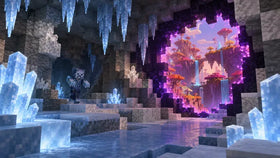
The changelog also includes fixes for ice-cave structure generation, jukebox playlist edge cases, cold-mob effects, and several interface and rendering issues. In particular, the notes mention ice caves being added to relevant structure-generation tags so strongholds and ruined portals can be considered there. Players exploring existing worlds should remember that world-generation changes generally matter most in newly generated chunks; do not assume every previously explored area will be rebuilt.
Jukebox playlist fixes are worth noting for builders who keep music discs in chests above jukeboxes. The changelog includes cases involving double chests changing state and playlist crashes tied to invalid playlist positions. If you maintain a large music room, test it in a copy of the world before moving a live build to the snapshot.
What Snapshot 5 does not mean
These are Java Edition 26.4 Snapshot 5 notes. Minecraft Bedrock Preview receives its own builds and changelog, and some similarly named features or balance adjustments may differ between the two tracks. Do not apply a Bedrock Preview change to Java Edition unless Mojang lists it in the Java snapshot notes too.
Snapshots are unfinished test versions and can contain bugs or break worlds. Mojang recommends backing up worlds or running snapshots in a separate folder. For the safest test, create a new installation, copy your world, and avoid opening your only copy in experimental software.
Frequently asked questions
Does Snapshot 5 improve FPS for every Windows player?
No. “Prefer DXGI Present” is experimental, Windows-only, and hardware-dependent. The changelog describes possible improvements to IME, variable refresh rate support, and fullscreen alt-tabbing—not a guaranteed frame-rate increase.
Will the new Ice ambient sound play from every Ice block?
No. The block needs the specific surrounding Ice, Air, and Water arrangement described in the official notes, and the sound is only emitted by chance.
Do regular survival players need to update data packs manually?
Not if they are playing without custom data packs. Players using third-party packs should check whether the pack supports the snapshot and whether its tag references or resource format need updates.
Is Snapshot 5 safe for my main survival world?
It is a testing version, so the safest approach is to back up your world and use a separate installation or copy. Do not assume a snapshot world will remain compatible with later releases.
Bottom line
Packed Ice Bricks are the obvious reason to try Minecraft 26.4 Snapshot 5, but the quiet changes deserve attention too. Ice ambience gives builders another environmental detail, the DXGI option offers a targeted experiment for compatible Windows systems, and the world-generation, tag, and login-protocol changes matter to technical players and server owners. Test them in a separate world, and use Mojang’s official changelog as the final reference when updating your setup.
Official sources: Minecraft 26.4 Snapshot 5 · Minecraft Feedback: Java Edition 26.4 Snapshot 5 · Minecraft 26.4 Snapshot 4
Related reading: Minecraft Switch 2 upgrade guide and Vibrant Visuals on Switch 2.