Roblox creators have long been able to post avatar accessories, clothing and bundles on social platforms, but measuring what happened after a potential buyer tapped a catalog link was harder than measuring the post itself. Roblox’s new Marketplace Links feature changes that part of the workflow: creators can generate trackable links for eligible avatar items and bundles, then compare clicks with purchases and Robux spend in Creator Dashboard.
The important shift is not simply that a link can be shared. It is that a creator can begin separating attention from commercial results. A post that attracts a large number of clicks may still produce few purchases; a smaller creator community may send fewer visitors but a stronger share of buyers. Marketplace Links gives creators a way to examine that difference using Roblox’s own link-level reporting.
What Roblox announced, and why creators should care
Roblox announced Marketplace Links on October 30, 2026. The feature is designed for creators promoting their own avatar assets outside Roblox. It supports avatar assets such as accessories and clothing, as well as bundles; both free and paid items can be linked. A creator can make a link for an item they published, or for an item published by a group they have permission to manage.
That ownership rule matters. Marketplace Links is not a general affiliate shortcut for sending traffic to any catalog item. The announcement says creators can only create links for items they or their group published. For group-owned items, the creator needs permission to configure the group’s avatar items.
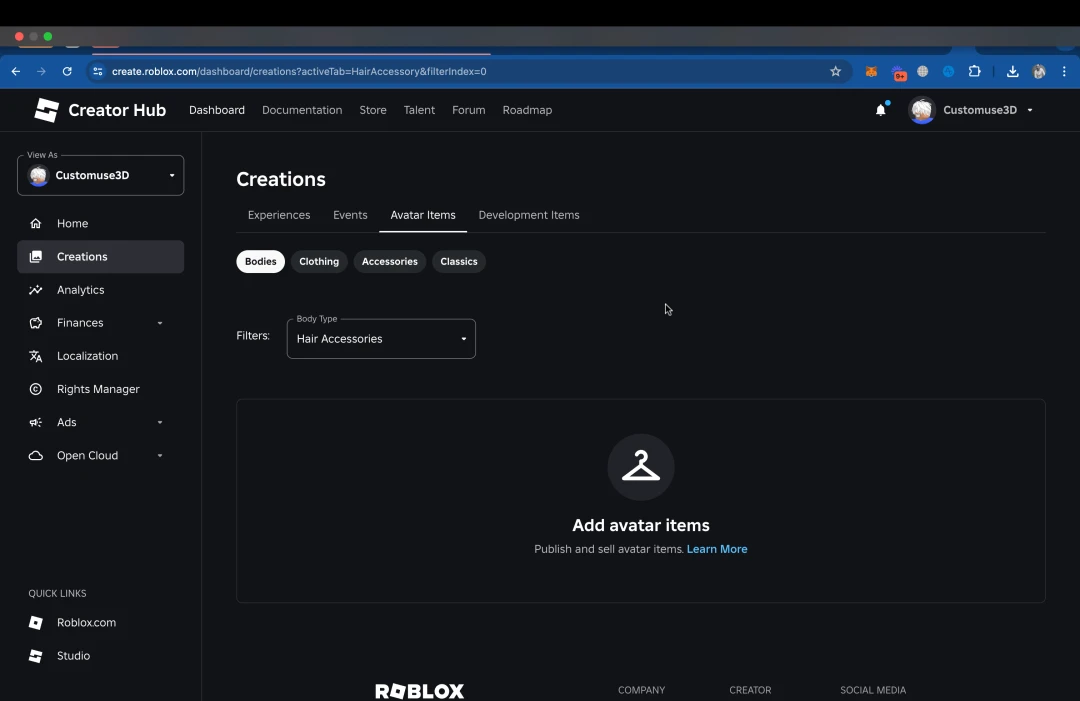
Roblox says links can be created in two places: from Creations → Share Links → Marketplace Links in Creator Dashboard, where a creator can select an item or enter its asset or bundle ID, or from the menu on an individual avatar item. The second route preselects that item in the link dialog.
The five numbers that turn a shared link into a campaign report
Each Marketplace Link has an analytics view. Roblox lists five core measures:
- Clicks: the total number of times the link was opened.
- Unique clickers: how many different people opened it.
- Purchases: purchases attributed to that link.
- Spend: the total Robux spent on those purchases.
- Conversion rate: purchases divided by unique clickers.
These measures answer different questions. Clicks describe total link activity, while unique clickers help distinguish repeat opens from a wider audience. Purchases and spend move the analysis closer to commercial outcomes. Conversion rate gives creators a way to compare how often the people who opened a link went on to buy.
For example, imagine a creator shares one item link in a short-form video and another in a community post. The video link might receive more opens, but the community post could produce more purchases per unique clicker. That would not automatically prove the community post is the better channel for every future launch, but it would be a useful signal to investigate alongside the creative, audience, item price and timing.

Why separate links for each platform can make the data more useful
Roblox says creators can have up to 20 active links for the same item. That creates a practical way to label individual placements instead of reusing one URL everywhere. A creator could make separate links for a YouTube description, an Instagram profile, a TikTok post, a creator newsletter and a community announcement, then compare their performance in the same reporting environment.
The useful habit is to keep the item constant while changing one distribution variable at a time. If the same accessory is promoted with different links, a creator can more clearly see which placement brought visits and purchases. If the image, price, item availability and post timing all change together, the comparison becomes less informative.
Roblox says the analytics can show up to 90 days of daily data and can be filtered by link. Reporting updates once per day, so a new link may take about a day before results appear. Creators should therefore avoid treating a newly published post as a failed campaign just because its dashboard is initially quiet.

What happens when a shared item changes?
The announcement also addresses a practical concern for creators who distribute links widely. Marketplace Links do not expire, and a creator can delete a link from the Marketplace Links list. However, deleting a link does not necessarily make the URL a dead end: Roblox says deleted links still open the item, but they stop recording clicks or purchases.
If an item goes off-sale or sells out, the link continues to open its item page and shows its current off-sale state. If the item is moderated or deleted, the link opens the Marketplace instead. This is useful to understand before adding a link to a campaign that may remain online for weeks or months. A working URL is not a promise that the item will remain purchasable.
Marketplace Links are not the same as game share links
Creators should not confuse this avatar-item feature with Roblox’s existing share links for experiences. Game share links are designed to measure off-platform user acquisition to a game’s details page, with reporting such as link visits and downstream engagement. Marketplace Links are for creator-owned avatar items and bundles, and the announcement describes item-level click, unique-clicker, purchase, spend and conversion reporting.
The distinction matters when a creator operates both a game and an avatar catalog. A game campaign should use the game share-link workflow; an accessory or bundle campaign should use Marketplace Links. Using the right link type keeps the destination and the reported outcome aligned.
Policy and practical limits creators should not overlook
Marketplace Links help measure promotion, but they do not cancel Roblox’s rules about where and how creators may direct users. Roblox’s Community Standards say external URLs may only be shared through permitted Social Links features on Game, Group or User detail pages, and that other efforts to direct users off-platform are prohibited. The Creator Hub also says social links are only visible to age-checked users aged 16 or older, subject to additional profile visibility rules.
That means creators should not treat a trackable Marketplace URL as permission to paste arbitrary external links into in-game chat, experiences or other restricted surfaces. Keep promotions on appropriate off-platform channels and follow Roblox’s current Community Standards and advertising rules. For creators who use paid promotion, Roblox’s Advertising Standards add separate restrictions that should be checked before a campaign goes live.
A simple measurement routine for avatar creators
- Choose one item or bundle that you or your group published.
- Create a Marketplace Link in Creator Dashboard and give it a clear internal label that identifies the channel and placement.
- Create separate links for the placements you want to compare, staying within the limit of 20 active links per item.
- Keep the item, price and creative as consistent as possible during the comparison period.
- Wait for the daily analytics refresh, then compare clicks, unique clickers, purchases, Robux spend and conversion rate.
- Use the results to decide where to test the next post; do not assume that the highest click count automatically means the strongest campaign.
For creators, the feature’s real value is the feedback loop. Instead of relying only on likes, views or comments on a social post, they can connect a specific placement with activity on the Roblox item page and purchases attributed to that link. It will not guarantee sales or reveal every reason a shopper decided not to buy, but it gives creators a more grounded way to learn which promotions are actually moving their catalog.
Frequently asked questions
Can I create a Marketplace Link for another creator’s avatar item?
No. Roblox says you can only create links for items you or your group published. Group items also require the relevant permission to configure avatar items.
Can I create more than one link for the same avatar item?
Yes. Roblox says up to 20 active links can exist per item. Separate links can help compare different posts or channels.
What analytics are available?
The link analytics include clicks, unique clickers, purchases, total Robux spend and conversion rate. Roblox says daily data is available for up to 90 days, with analytics refreshed once a day.
Do Marketplace Links expire?
No. Roblox says the links do not expire. Creators can delete them, but deleted links continue to open the item and stop recording clicks or purchases.
Will a link still work if the item is off-sale?
Yes. Roblox says it will open the item page and show the current off-sale state. If the item is moderated or deleted, the link opens the Marketplace instead.
Official sources and further reading
- Roblox announcement: Promote Your Avatar Items Off-Platform and Track Every Click
- Roblox Creator Hub: Social media links
- Roblox Creator Hub: Share links for experiences
- Roblox Community Standards
- Roblox Creator Hub: Acquisition analytics
By Shivam Das