Roblox Studio’s built-in Model Context Protocol (MCP) server is changing the way creators can work with AI coding tools. Instead of asking an assistant for a script and manually carrying every result into Studio, a connected MCP client can inspect an open place, read and edit scripts, run Luau, explore assets, and help test gameplay. The bigger opportunity is not simply letting several AI agents work at once. It is giving each agent a clearly bounded job, a shared understanding of the project, and a reliable way to prove that its changes work.
That distinction matters. Multiple agents can speed up a game-development task, but they can also create conflicting edits, target the wrong Studio window, or mistake a successful code response for a working game. Roblox’s recent MCP changes address part of that coordination problem. Creators still need a deliberate workflow for planning, permissions, review, and playtesting.

What Roblox Studio MCP actually connects
MCP stands for Model Context Protocol, an open standard for connecting AI clients to external tools and applications. Roblox’s MCP server is built into Studio and runs locally alongside an open Studio session. An MCP-compatible client communicates with that server over standard input/output transport, then calls the tools exposed by the active Studio session.
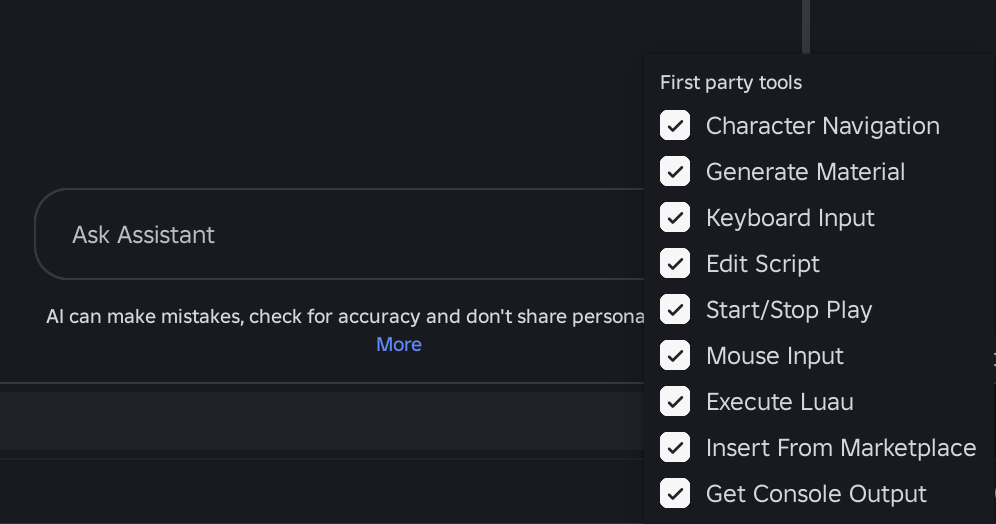
Those tools cover several parts of development: reading and searching scripts, applying multiple script edits, exploring the game’s data model, inspecting instances, executing Luau, searching and inserting Creator Store assets, generating certain assets, capturing the viewport, and starting or stopping playtests. The exact tool set can evolve as Roblox updates Studio, so creators should use the live Creator Hub documentation rather than copying an old tool list from a tutorial.
The multi-agent change that makes coordination more dependable
In its August 19, 2026 Developer Forum update, Roblox said every MCP tool call now takes a studio_id. That means a client explicitly identifies the Studio instance it intends to address instead of relying on a previously selected active session. Roblox also said set_active_studio was removed from this routing workflow, and that list_roblox_studios now returns a Place ID when one is available.
For creators with more than one place open, this is a practical improvement. Two Studio windows can have similar names; a duplicated test place can look almost identical to the production place. A Place ID adds a stronger identifier, while the required studio_id makes the target explicit on each call. Neither detail replaces human review, but both reduce the chance that an agent quietly operates on the wrong window.

A practical four-role workflow for creators
Roblox has described broader agentic workflows for planning, building, and testing, and its MCP tools can support more than one client or agent. The four-role structure below is a workflow recommendation for creators, not a claim that Roblox ships four fixed agent personas.
1. Planner: turn the idea into a reviewable task list
Give the planning agent read-only access first. Ask it to inspect the relevant parts of the data model and scripts, identify dependencies, and produce a short implementation plan. A useful plan names the systems likely to change, the files or instances involved, the expected player-facing result, and the tests that will demonstrate success. Ask it to flag unknowns rather than inventing object paths or assuming how an existing system works.
2. Builder: make one bounded change at a time
Assign the implementation agent a narrow task, such as adding a cooldown to one ability or correcting a single shop interaction. Specify the expected behavior, the permitted scripts or folders, and what must remain unchanged. Avoid giving several agents permission to edit the same script simultaneously. If two tasks depend on the same module, sequence them or have one agent prepare a proposed patch for review.
3. Reviewer: inspect the diff and look for side effects
A separate reviewer should compare the proposed changes with the original task. It can search for duplicate event connections, unbounded loops, client-trusted currency changes, missing server validation, unexpected remote calls, and edits outside the agreed scope. A reviewer that only asks the builder whether the code is correct is not an independent check; give it the task brief and the actual changed code.
4. Playtester: verify the player experience
The final agent should test the feature in Studio rather than treating a successful script execution as proof. Reproduce the relevant player action, inspect output logs, check both expected and failure paths, and capture the viewport when visual behavior matters. For a multiplayer feature, test more than one client where practical. Return a concise report: steps attempted, results, errors, and anything that still needs a human decision.

Why the tools menu and playtest loop matter
Roblox’s March 5, 2026 Studio update brought the MCP server directly into Studio and described tools for starting and stopping playtests, reading console output, simulating mouse and keyboard input, and navigating a character. Later updates added more ways to inspect and generate content. The value is the feedback loop: an agent can make a change, run a test, observe the result, and report what happened.
Creators should still distinguish between simulated input and direct character navigation. Moving a character to a position can help inspect a scene, but it does not prove that a player can reach that position through the game’s actual controls. Similarly, a script that runs without an error may still behave incorrectly when a player triggers it in a real sequence.
Guardrails that prevent multi-agent mistakes
-
Confirm the target every time. Use the correct
studio_idfor each call and verify the Place ID when multiple Studio sessions are open. - Keep production and test places separate. Use a test copy or controlled branch for experimental changes, and do not let an agent publish or overwrite a live experience as an unreviewed shortcut.
- Limit write access. Give research and review agents read-only work where possible. Grant edit or execution access only to the agent that needs it for the current task.
- Define file ownership. Do not let two builders independently rewrite the same script. Use small patches and integrate them deliberately.
- Protect secrets and private data. Roblox warns that connecting third-party AI tools can share data with those providers. Review each provider’s privacy terms and avoid exposing API keys, credentials, player personal information, or private project material unnecessarily.
- Require evidence. A finished task should include the changed paths, a summary of the edits, playtest steps, relevant console output, and any remaining limitations.
- Keep a human approval point. Review destructive edits, economy changes, permissions, purchases, data persistence, and anything that could affect real players before release.
What Roblox’s creator adoption figure does—and does not—say
In an April 15, 2026 newsroom post, Roblox said 44% of its top 1,000 creators used Roblox Assistant or third-party AI tools through MCP to plan, build, and test games. Roblox defined the measurement window as March 6 through April 7, 2026, with the top creators ranked by Robux spent in experiences over the 28 days ending April 7. That is a meaningful signal of adoption among a specific high-performing group; it is not a claim that 44% of all Roblox developers use MCP.
The same post described the plan-build-test direction of Studio’s agentic tools, including reviewable plans, asset generation, and a playtesting agent beta. Roblox also said it was working toward more parallel agent workflows. The distinction is important: creators can build useful multi-agent processes with connected clients today, but specific capabilities and availability can change. Check the current Studio release notes and Creator Hub before relying on a beta feature in a production pipeline.

How to get started without overengineering the setup
- Update Roblox Studio and install an MCP-compatible AI client you trust.
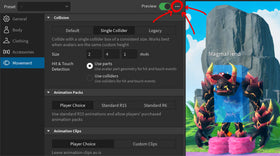
- Open the project you intend to work on, then open Assistant and choose the MCP server settings.
- Enable Studio as MCP server. Use Quick Connect if your client is listed, or follow the current Windows or macOS configuration instructions in Creator Hub.
- Confirm that the client appears as connected in Studio. If it does not, check the command path and JSON syntax, then restart Studio and the client as Roblox recommends.
- Start with a read-only request: ask the agent to list the relevant scripts or describe the game tree. Confirm that it is looking at the correct place.
- Run one small task through the planner, builder, reviewer, and playtester sequence before adding more agents or broader permissions.
For current setup instructions and supported clients, use the Roblox Studio MCP documentation. Roblox’s April agentic-workflows announcement explains its plan-build-test direction, while the August multi-agent update details the explicit Studio routing changes.
The bottom line for Roblox creators
Studio MCP makes it possible for AI clients to work with a real, open Roblox project instead of operating only on pasted code. Multi-agent workflows become useful when they divide work cleanly: one agent understands the project, another makes a limited change, a third checks it, and a final one tests the player experience. Roblox’s move to explicit Studio IDs makes multi-session coordination clearer, but it does not remove the need for permissions, source review, and human sign-off. The strongest workflow is not the one with the most agents. It is the one that can explain exactly what changed, where it changed, and how the result was verified.
Frequently asked questions
What is Roblox Studio MCP?
It is Roblox Studio’s built-in Model Context Protocol server. It lets compatible AI clients communicate with an open Studio session to inspect project data, work with scripts and assets, execute Luau, and assist with playtesting.
Can multiple AI agents connect to Roblox Studio?
Roblox’s MCP updates support workflows involving multiple AI clients and Studio instances. Every tool call now specifies a studio_id, so the target Studio session is explicit. How many agents should edit at once is a workflow decision; creators should avoid simultaneous writes to the same scripts.
What changed in the August 2026 MCP update?
Roblox made Studio targeting explicit by requiring studio_id on each tool call, removed set_active_studio from that routing workflow, and added Place ID information to the list of connected Studios when available.
Does MCP automatically make a Roblox game safe to publish?
No. MCP gives an AI client tools to interact with Studio, but creators remain responsible for reviewing generated code, testing multiplayer behavior, protecting player data, and approving changes before release.
Which AI clients can connect to Roblox Studio MCP?
Roblox’s current Creator Hub documentation lists Quick Connect options including Antigravity, Codex CLI, Claude Code, Claude Desktop, Cursor, Gemini CLI, and Visual Studio Code. The list and setup steps can change, so check the live documentation for the latest compatibility information.