Updated November 1, 2026 | By Shivam Das
Roblox is expanding its Character Controller Library (CCL) with two player-facing movement abilities—Sprint and Crouch—and a Custom Abilities API that gives creators a more structured way to build mechanics such as dashes, wall-jumps, gliding, charged jumps and special movement states. The update is significant because it moves more character behavior onto a configurable, scriptable system rather than leaving creators to build every movement feature around the legacy Humanoid state machine.
Quick answer: The CCL update announced on September 10, 2026 adds toggle-based Sprint and Crouch, a reusable ability lifecycle, rules for when abilities start and stop, and cross-platform Action Slots. The expanded features are being tested through Roblox Studio Beta; creators must opt in and should check the current Creator Hub documentation before using them in a live experience. Roblox's original CCL itself was released for live experiences in April 2026.
What changed in the Character Controller Library?
The September 10 Studio Beta announcement describes three major additions: new default movement abilities, the Custom Abilities API, and Action Slots that standardize ability inputs across keyboard and mouse, gamepads, and touchscreens. Roblox also said the update improves legacy Shift-Lock behavior. These additions build on the CCL's April 8 full release, which introduced a Luau-based character movement framework for live experiences.
Sprint: a faster movement state
The new default Sprint ability increases movement speed by 1.5 times while toggled on. Its default input is Left Shift on keyboard and mouse, L1 on gamepad, and the second on-screen action button on touch devices. The ability uses Toggle input mode, so players switch it on and off rather than needing to keep the key held down.
Crouch: lower stance and slower movement
Crouch lowers the character's stance and reduces movement speed to half. Roblox lists the crouch height as 0.55 times hip height for R6 and 0.67 times hip height for R15. Default controls are Left Ctrl on keyboard and mouse, the B button on gamepad, and the third touch action button. The ability can support level design where players move beneath low ceilings, take cover, or stay less visible.

How the Custom Abilities API works
The Custom Abilities API gives each ability a defined lifecycle and a predictable place for its logic. Roblox's September beta announcement lists five main callbacks:
- OnSetup: runs when the ability is registered, making it suitable for initialization and caching references.
- OnStart: runs when the ability activates, such as when a dash begins.
- OnUpdate: runs while the ability is active and can handle frame-by-frame behavior.
- OnStop: runs when the ability ends, allowing the mechanic to remove temporary effects or restore movement.
- OnTeardown: runs when the ability is removed, providing a place to clean up resources and connections.
Creators can add or remove abilities at runtime with AddAbility and RemoveAbility. Activation rules such as StartsWhen, RunsWhile, Blocks and Stops determine when a mechanic can run and which other abilities it can interrupt or prevent. The All, Any and Not helpers allow conditions to be combined without building a separate state machine for every mechanic.
For example, a dash might start only when the character is grounded and its cooldown label is absent. A stagger effect could stop a sprint ability. A glide ability might remain active only while the character is airborne. This shared rules model can make custom mechanics easier to reason about, especially when several abilities could compete for control of the same character.

Action Slots make inputs more consistent across devices
Action Slots map a single ability input to platform-specific controls. For example, Slot 1 maps to Space on keyboard and mouse, the A button on gamepad, and a touch button on mobile. Sprint and Crouch are assigned to their own default slots, while custom abilities can request a particular slot or use an available one.
| Ability or slot | Keyboard and mouse | Gamepad | Touch |
|---|---|---|---|
| Jump / Slot 1 | Space | A | Button 1 |
| Sprint / Slot 2 | Left Shift | L1 | Button 2 |
| Crouch / Slot 3 | Left Ctrl | B | Button 3 |
| Slot 4 | R | X | Button 4 |
Each ability can also define how its input behaves. Press is useful for a one-time action, Hold for an ability that remains active while a button is held, Toggle for a state that stays on until switched off, and Hold with Repeats for a repeated action cycle. The distinction matters: an ability's input behavior should be configured through Input.Mode, while RunsWhile should describe world conditions such as being grounded or airborne.

How creators can enable the CCL beta
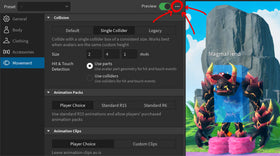
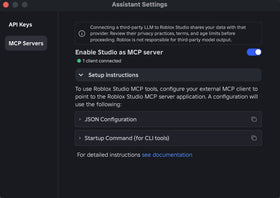
The CCL is opt-in. Roblox's Creator Hub documentation says creators should save or publish the experience, open Studio's Avatar tab, select Avatar Settings, go to Movement, and choose Character Controller Library under Abilities. The September beta additions also require enabling the AvatarAbilities Character Controller Library option under File > Beta Features and restarting Studio. Roblox's announcement further says PlayerScriptsUseInputActionSystem in Workspace should be enabled; using Server Authority is strongly recommended for projects adopting the Custom Abilities API.
- Save or publish the experience so Avatar Settings are available.
- Open Avatar Settings from the Avatar tab and select Movement.
- Choose Character Controller Library in the Abilities section.
- Enable the AvatarAbilities Character Controller Library Studio Beta under File > Beta Features, then restart Studio.
- Check that Workspace.PlayerScriptsUseInputActionSystem is enabled and review the current API guide before implementing custom mechanics.
- Test on R6 and R15 rigs, keyboard and mouse, gamepad, and touch devices before releasing the experience.

Important compatibility limits and October API changes
This is a beta feature set, not a reason to replace every working character controller immediately. In its September announcement, Roblox said it did not yet recommend combining the CCL with Tools, Inventory/Backpack, or Health systems because compatibility work was still underway. The same post identified gamepad input conflicts involving inventory and tool controls on L1, R1 and R2, which can block some action slots. Creators should test their exact control scheme rather than assume every slot is available in every experience.
Roblox posted an additional beta update on October 8, 2026. It clarified that button input belongs in Input.Mode rather than inside RunsWhile, changed repeated input configuration to Hold with Repeats = true, and made ability names unique identifiers—duplicate names now trigger an error instead of being silently renamed. The update also fixed cases where abilities registered during client loading could be dropped and corrected a toggle-state issue when an ability stopped itself.
There are also practical engineering considerations. Roblox recommends Server Authority for custom abilities because the initial API is being targeted at that networking model. The September post warned that Automatic authority mode could produce unreliable behavior in some cases. Callbacks run in predicted client simulation and authoritative server simulation, so creators should keep their logic deterministic and avoid yielding inside callbacks.

What Roblox says is coming next
The September announcement described several areas Roblox was exploring or preparing for future updates: more configurable default ability settings, improved animation integration, lower-cost idle behavior, first-class NPC support, a modifier system for stacking gameplay effects, ability debugging tools, and native object-interaction mechanics such as Reach & Hold and Aim & Throw. These were described as upcoming work, not features creators should assume are already generally available. Check the live Creator Hub documentation and subsequent Studio release notes before planning around them.
Why the update matters for Roblox developers
The practical benefit is not simply that players can sprint or crouch. The larger change is that creators can build movement mechanics as modular abilities that coordinate through shared rules, input slots and lifecycle callbacks. That can reduce duplicated scripts and make it easier to combine mechanics—for example, allowing a stagger to interrupt sprint, preventing a dash while stunned, or enabling a special jump only after a player unlocks it.
At the same time, the beta status and compatibility warnings matter. Existing experiences are not automatically switched over: Roblox says adoption is opt-in through Avatar Settings, and the company does not intend to alter existing experiences without creator permission. For established games, the sensible approach is to test the CCL in a copy of the experience, compare movement and physics behavior, and migrate only after validating the systems that depend on the character.
Related Roblox Studio coverage
- Roblox Studio’s Tunable Collision Geometry: How Precision Controls Work
- Roblox Studio Beta Adds Animation State Machines and Luau Expressions
- Roblox Studio Package Overrides: How the Beta Changes Package Editing
Frequently asked questions
What is the Roblox Character Controller Library?
It is a modular character movement framework built around Luau scripts, abilities and controller components. It gives creators more direct control over movement behavior than a fixed collection of Humanoid states.
Are Sprint and Crouch available to every Roblox game automatically?
No. The CCL and its new beta features are opt-in. Creators need to enable the library through Studio settings and the relevant beta feature, then test their experience.
What does the Custom Abilities API let developers create?
It provides a structured way to define mechanics such as dashes, custom jumps, gliding, charged movement and environmental reactions, with callbacks for setup, activation, updates, stopping and cleanup.
Does the Character Controller Library support R6 and R15?
Roblox's beta announcement says the CCL supports both R6 and R15 rigs. Creators should still test their own animations, avatar settings and custom scripts on both rig types.
Should creators use Server Authority with custom abilities?
Roblox strongly recommends Server Authority for new projects using the initial Custom Abilities API. The September announcement identifies Server Authority as the target networking model for the first release of the API.
Can the CCL be used with Tools, Inventory and Health systems?
Roblox's September beta announcement did not recommend using the CCL with Tools, Inventory/Backpack or Health at that time because compatibility work was ongoing. Check the latest documentation and test these systems before shipping.
Official sources and documentation
- Roblox Developer Forum: Expanding the Character Controller Library, September 10, 2026
- Roblox Developer Forum: October 8, 2026 beta API changes
- Roblox Creator Hub: Character Controller Library documentation
- Roblox Creator Hub: CCL quick start
- Roblox Creator Hub: Custom abilities guide
- Roblox Developer Forum: Character Controller Library full release, April 8, 2026
Reporting note: This article distinguishes features described in Roblox's Studio Beta announcement from features documented for the released CCL. Beta availability, API behavior and compatibility can change; creators should consult the official Creator Hub and Studio release notes before publishing an experience update.