For U.S. Roblox creators · Updated November 2, 2026 · By Shivam Das
Roblox Studio’s new Scene Generation beta changes one of the slowest early steps in level design: turning a rough idea into a space that can actually be tested. Announced on October 30, the tool can use a written prompt, a reference image, or both to create an editable environment made from models, textures, and terrain. Roblox says a typical generation takes about two to three minutes.
That speed is useful, but the real question for creators is what happens after the first scene appears. A generated skate park can look convincing and still have awkward ramps. A forest arena can be attractive but leave players with poor sightlines. The strongest workflow treats generation as a fast blockout—not a finished level—and uses playtests to decide what stays.

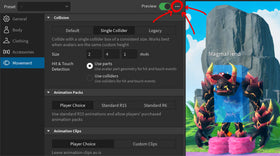
Illustrative Roblox scene-generation prompt window shown inside the Roblox Career Center. It is a visual example, not a claim that this is the exact new Studio beta interface. Image: Roblox.
What the Scene Generation beta actually creates
Roblox describes Scene Generation as a way to create a scene from a source image and/or text prompt. The output can contain models, textures, and terrain, with individual elements available for further editing. Creators can also guide the generation’s size and position and choose whether to use procedural models or meshes.
The feature is designed to help developers test an environment idea without manually placing a large number of primitives or building every procedural asset first. It does not automatically create a complete, publish-ready game. Scripting, objectives, player controls, UI, audio, progression, multiplayer logic, moderation considerations, and final quality assurance remain separate parts of development.
How to open Scene Generation in Studio
Use Assistant with the generate_scene command
- Open the place you want to work on in Roblox Studio.
- Open Assistant and enter
/generate_scene, followed by a clear description of the environment. - Explain the scene’s purpose, layout, art direction, important objects, and anything that should be excluded.
- Attach a reference image when it will clarify the composition or visual style.
- Review the result and edit the generated elements to fit the game’s mechanics.
At launch, Roblox says the Assistant route is limited to one reference image. The company says it plans to bring multiple-image support to Assistant in a future update.
Use the viewport’s Generate menu
- Right-click inside the Studio viewport.
- Choose Generate, then Scene.
- Enter the prompt and add reference images.
- Set the scene’s size and position, then choose the available generation approach.
- Generate, inspect, and refine the environment.
The right-click workflow can accept multiple images. That makes it useful when one reference should define the layout and another should define the art style, material palette, or lighting. State the role of each image in the prompt instead of assuming the model will infer it.

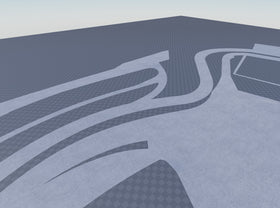
Roblox’s RDC 2026 visual introduced the direction of prompt-driven scene creation before the Studio beta launch. Image: Roblox.
Prompting advice: describe gameplay, not just scenery
A weak prompt lists objects: “a city with roads, shops, and trees.” A stronger prompt explains how the space should function: “Create a compact city block for a four-player chase game, with two clear escape routes, readable intersections, low cover near the center, and no narrow dead ends.” The second prompt gives the generator more useful design constraints.
- Start with the player activity. Say whether the space is for racing, exploration, combat, social play, or an obstacle course.
- Describe the layout. Specify paths, entrances, landmarks, open areas, vertical levels, and sightlines.
- Set the visual direction. Name the palette, materials, time of day, atmosphere, and level of detail.
- State exclusions. Tell the generator what not to add, such as extra terrain, decorative clutter, blocked doors, or unnecessary structures.
- Keep the first request manageable. Generate a room, street, courtyard, or arena section before attempting a huge world.
Roblox’s own best-practice guidance recommends building large environments incrementally and maintaining a short, reusable art-direction description across generations. That can improve consistency when separate rooms or districts need to feel as though they belong to the same game.
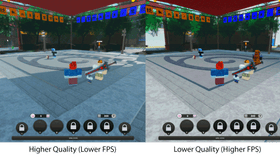
This earlier Roblox Studio Assistant example shows how generated or inserted assets can be placed into a 3D environment. It is not the Scene Generation beta screen. Image: Roblox.
What to test before keeping a generated scene
Do not judge the result only from the editor camera. Switch to the player’s perspective and test the environment as a real level.
- Movement: Can players reach the important areas without getting stuck or making unintended jumps?
- Collision: Do ramps, stairs, doors, props, and terrain behave as expected?
- Scale: Are doorways, cover, platforms, and landmarks sized correctly for the avatar and camera?
- Visibility: Can players see objectives and threats, or do generated objects create unfair blind spots?
- Performance: Does the scene remain responsive on the devices your audience is likely to use?
- Navigation: Are routes readable, spawn points safe, and important destinations easy to recognize?
- Consistency: Do materials, lighting, object scale, and visual language match across separately generated sections?
Roblox says generation usually takes around two to three minutes, but that is a generation-time estimate—not a guarantee that a scene is ready for production. Refinement and device testing still determine whether the result is usable.
Procedural-model example illustrating editable parameters in Studio. Scene Generation can use procedural models, but this screenshot is not a direct capture of the new beta. Image: Roblox.
How Scene Generation fits with Roblox’s other AI tools
Scene Generation sits alongside a broader set of creator tools rather than replacing them. Roblox Assistant can answer development questions, modify objects and scripts, insert Creator Store assets, and generate 3D meshes or procedural models. Procedural Models are parameter-driven objects: changing their attributes or size can regenerate their contents. Scene Generation works at a larger environment level by helping establish a space made from multiple elements.
That distinction matters. Use scene generation to establish a room or outdoor layout; use procedural models when a particular object needs repeatable, adjustable variations; and use Assistant for targeted edits or scripting tasks. The tools can complement one another, but each output still needs inspection.

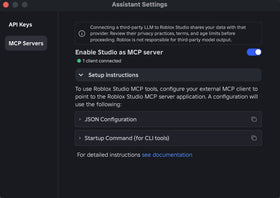
Roblox Creator Hub documentation visual for mesh generation. It illustrates an adjacent AI creation workflow, not the Scene Generation interface. Image: Roblox Creator Hub.
What is still missing from the beta?
Roblox’s launch announcement identifies several capabilities as future work. A new Generate tab in Studio’s ribbon is planned, along with additional creator controls for specifying a scene and choosing between procedural models or procedural models plus generated meshes. Roblox also says it intends to add multiple-image support to Assistant.
Creators should therefore distinguish what is available in the initial beta from what Roblox has described as coming next. The announcement does not promise that every planned control is already available, nor does it provide a fixed public release date for those additions.
Why this could change early level design
Scene Generation’s strongest potential benefit is not eliminating level designers. It is reducing the amount of repetitive setup required before a team can test an idea. A developer can move from a rough concept to a spatial prototype, then spend more time evaluating flow, difficulty, pacing, and atmosphere.
That also makes creative judgment more important. If many teams can quickly generate a plausible forest, city street, or sci-fi room, a game’s identity will depend less on the first batch of scenery and more on its mechanics, level structure, sound, progression, and memorable details. Fast generation can lower the cost of experimentation; it cannot supply a compelling game design by itself.
Frequently asked questions
Is Roblox Scene Generation available now?
Roblox announced it as a beta in Studio on October 30, 2026. The launch post describes access through Assistant or the viewport’s Generate menu.
What command opens Scene Generation?
Use /generate_scene in Roblox Studio Assistant. You can also right-click the viewport and choose Generate > Scene.
Can I use more than one reference image?
The viewport menu supports multiple images. At launch, the Assistant command is limited to one image; Roblox says it plans to add multi-image support there later.
How long does it take to generate a scene?
Roblox says a generation usually takes about two to three minutes. Actual results can vary with the request.
Can I edit the generated environment?
Yes. Roblox describes the output as an editable scene whose models, textures, and terrain can be adjusted individually.
Does Scene Generation make a complete Roblox game?
No. It helps create an environment. Developers still need to build gameplay systems, scripts, interfaces, audio, progression, multiplayer behaviour, and test the experience.
Official sources and further reading
- Roblox: Introducing Scene Generation — Prototype Scenes Faster
- Roblox: Weekly Recap, October 26–30, 2026
- Roblox Creator Hub: AI on Roblox
- Roblox Creator Hub: Procedural Models
- Roblox: RDC 2026 — The World Needs More Play
Author: Shivam Das
Editorial note: Product details in this guide are based on Roblox’s official October 30 beta announcement and Creator Hub documentation available at the time of writing. Screenshots are credited in their captions; images showing earlier or adjacent Studio tools are identified as illustrative rather than representations of the exact new beta interface.