Roblox developers have a new way to organize character animation logic. State Machine and Luau Expression nodes entered beta in the Animation Graph Editor on October 8, 2026, giving creators a visual place to define which animation can follow another and calculate transition conditions. The practical appeal is straightforward: a combo can progress from one swing to the next without a separate script tracking every animation state, while locomotion can move between running, falling, and landing with fewer scattered conditions.
There is one important boundary. Roblox announced these additions as a Studio beta, and its announcement says State Machines and Expressions work in Studio only during the beta—not in live experiences. Developers can build and preview the workflow, but should not plan a live-game release around beta-only behavior until Roblox changes that availability.

What the new beta actually adds
The Animation Graph Editor became generally available in July 2026. It lets creators connect animation clips and processing nodes into a visual graph. The October beta adds two pieces that make the graph more useful for state-driven behavior:
- State Machine nodes group animation logic into named states and define the allowed transitions between them.
- Luau Expressions calculate node properties or transition conditions from graph parameters, using a restricted Luau-like syntax.
Before state machines, a developer could use a Priority Select node to check conditions, but that node did not remember which animation state the character was currently in. A condition intended for the second swing of a combo could therefore be evaluated while the character was still idle. Developers often had to track the current state in a script and feed that information back into the graph. A state machine makes the permitted route visible in the graph itself.

How a state machine controls movement
A state machine contains named states. Each state can use an animation clip, a blend node, or another state machine. One state is marked as the entry state, which determines where playback begins. Transitions connect a source state to a destination state and define when the graph is allowed to move between them.
Consider a character that runs off a ledge, falls, lands, and returns to normal movement. Roblox's documentation uses a three-state example:
- Locomotion: a Blend1D node handles the idle-to-run range using a Speed parameter.
- Fall: a falling clip plays after the character leaves the ground.
- LandIdle: a landing clip plays after contact, then blends back into locomotion.
The graph begins at Locomotion. When the Grounded parameter becomes false, the Locomotion-to-Fall transition can fire. When Grounded becomes true again, the graph moves from Fall to LandIdle. The final transition can wait for the landing clip to finish—or begin blending shortly before the clip ends—so the return to running does not feel like a hard cut.

Transition conditions, priorities, and blend timing
For a condition-based transition, choose the expression option and enter a boolean parameter or supported expression—for example, not Grounded or Speed >= 12. For an animation that should complete first, choose the Finished option. The When setting can start the blend after the outgoing clip finishes or before it finishes.
Roblox documents two supported transition curves: Linear and CubicV2. The default transition duration is 0.15 seconds. The state-machine documentation's movement example uses 0.2 seconds for Locomotion-to-Fall, 0.1 seconds for Fall-to-LandIdle, and a 0.2-second blend back to Locomotion before the landing clip finishes. These are example values, not universal settings; tune them against the speed and style of your own animations.
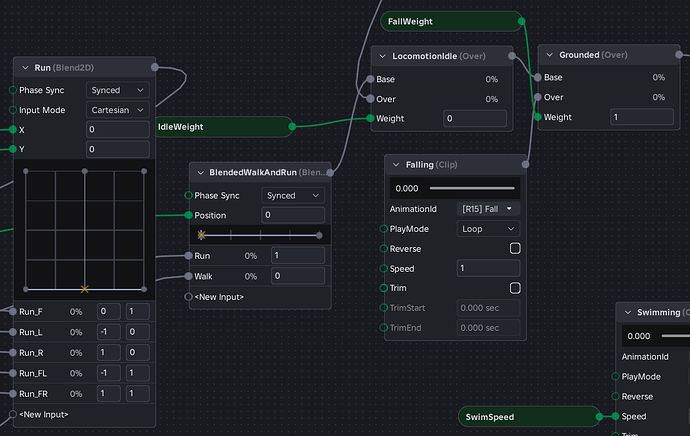
Priority matters when multiple transition expressions can be true on the same frame. The transition with the higher Priority value is evaluated first. Roblox's documentation advises using distinct priorities when competing transitions need predictable ordering; equal priorities can result in a random choice. Avoid overlapping conditions where possible, and make the intended order explicit.
What Luau Expressions can—and cannot—do
Expressions move small calculations closer to the graph nodes that use them. For example, a Blend1D position can be normalized with math.clamp((MovementSpeed + 0.5) / MaxSpeed, 0, 1). A conditional expression can choose a label based on speed, while a boolean expression can decide whether a transition should fire.
The supported syntax includes arithmetic operators, comparisons, and, or, not, conditional expressions, the math library, supported Vector3 construction and member access, string concatenation, and certain multi-line expressions with local variables.
This is not a full Luau runtime. Expressions do not support loops, function definitions, tables, require(), method calls such as object:Method(), libraries other than math, or direct DataModel access. If an expression needs to inspect Workspace or a character property, pass the value into the graph as a parameter from a script instead.
How to try the beta in Roblox Studio
- Open Roblox Studio and choose File.
- Select Beta Features.
- Enable Animation Graphs State Machines.
- Open an Animation Graph and insert a State Machine node.
- Create named states, connect the relevant clip or blend nodes, and set the entry state.
- Add transitions and configure their expression or Finished condition, duration, curve, and priority.
- Preview the graph, then inspect the Output window if an expression fails to parse or evaluate.
Roblox's October 8 beta announcement also listed early limitations, including the inability to manually set a state or trigger a transition from the editor at that time. The announcement noted a parameter-node behavior that the team planned to fix. Those were launch notes, so check the current Studio build and Creator Hub documentation rather than assuming every early issue remains unchanged.
Scripts still connect gameplay to animation
State machines reduce the amount of transition logic that must live in a script, but they do not remove gameplay code. A script still needs to read the character's movement and grounded state, then send those values to the graph with AnimationTrack:SetParameter(). The graph can then use the parameters in its expressions and transitions.
local RunService = game:GetService("RunService")
local humanoid = character:WaitForChild("Humanoid")
local root = character:WaitForChild("HumanoidRootPart")

RunService.Heartbeat:Connect(function()
    animationTrack:SetParameter(
        "MovementSpeed",
        root.AssemblyLinearVelocity.Magnitude
    )

    animationTrack:SetParameter(
        "Grounded",
        humanoid.FloorMaterial ~= Enum.Material.Air
    )
end)
This is a starting pattern, not a complete character controller. Use the correct character, Animator, and AnimationTrack references for your project, and test whether the parameter update runs in the appropriate client or server context for the graph's authority mode. Roblox's Animation Graph documentation explains the different parameter-driving responsibilities for player characters and NPCs.
Where creators should use state machines first
The clearest early wins are systems with a defined sequence: melee combos, weapon reloads, equip-and-holster animations, jump/fall/land movement, traversal, and multi-stage emotes. These behaviors have rules about what can happen next. A state machine makes those rules easier for an animator and a programmer to inspect together.
For simple idle-to-run blending, a Blend1D node may already be enough. A state machine becomes more valuable when the character needs to remember a stage, block an invalid transition, or wait for a clip to reach a specific point. Expressions are useful for compact calculations; keep more complex gameplay decisions in ordinary Luau scripts.
What developers should test before relying on it
- Check that every state has the correct animation node connected and that the entry state is intentional.
- Test transitions at boundaries: takeoff, landing, the end of a combo, and interruptions such as unequipping a weapon.
- Give competing transitions distinct priorities and make their conditions mutually exclusive where practical.
- Adjust blend durations and curves while watching for foot sliding, pose popping, or a landing animation that is cut off too early.
- Confirm that scripts update every graph parameter the expressions depend on.
- Test in Studio preview and play-test separately; do not assume Studio beta availability means the feature is ready in a live experience.
Bottom line: a clearer animation workflow, not a no-code controller
Roblox's State Machine and Luau Expression beta gives creators a more legible way to describe animation flow and calculate small transition values. It can reduce duplicated state-tracking code and make animation behavior easier to review. But scripts still supply live gameplay data, the expression language is intentionally limited, and the October announcement says the beta is Studio-only for now. The sensible move is to prototype a contained system, test edge cases, and wait for Roblox's release notes before treating it as a production feature.
Frequently asked questions
Are Roblox Animation State Machines available in live games?
Not during the beta described in Roblox's October 8, 2026 announcement. The announcement says State Machines and Expressions work in Studio only at this stage.
Do State Machines replace Humanoid states?
No. They manage animation states and transitions. Gameplay states such as jumping or dying still come from the Humanoid or a game's own scripts, and those values can be passed into the graph as parameters.
Do developers still need Luau scripts?
Yes. Scripts still collect gameplay information and update graph parameters. The beta lets creators move more animation transition logic and parameter math into the graph.
Can a Luau Expression read Workspace or character properties directly?
No. Expressions read graph parameters and support a restricted syntax. A script must pass any required gameplay values into the graph.
What happens if two transitions are valid at once?
The transition with the higher Priority value is evaluated first. Roblox's documentation recommends distinct priorities when competing transitions need predictable behavior.
Where can I learn the official workflow?
Start with the Animation Graph Editor documentation, the State Machine guide, and the Graph Editor Expressions guide. Roblox's original October 8 beta announcement explains the release scope and launch limitations.
Sources and reporting notes
- Roblox Developer Forum: Introducing State Machines and Luau Expressions for Animation Graphs, October 8, 2026.
- Roblox Creator Hub: Graph Editor state machines.
- Roblox Creator Hub: Graph Editor expressions.
- Roblox Creator Hub: Animation Graph Editor.
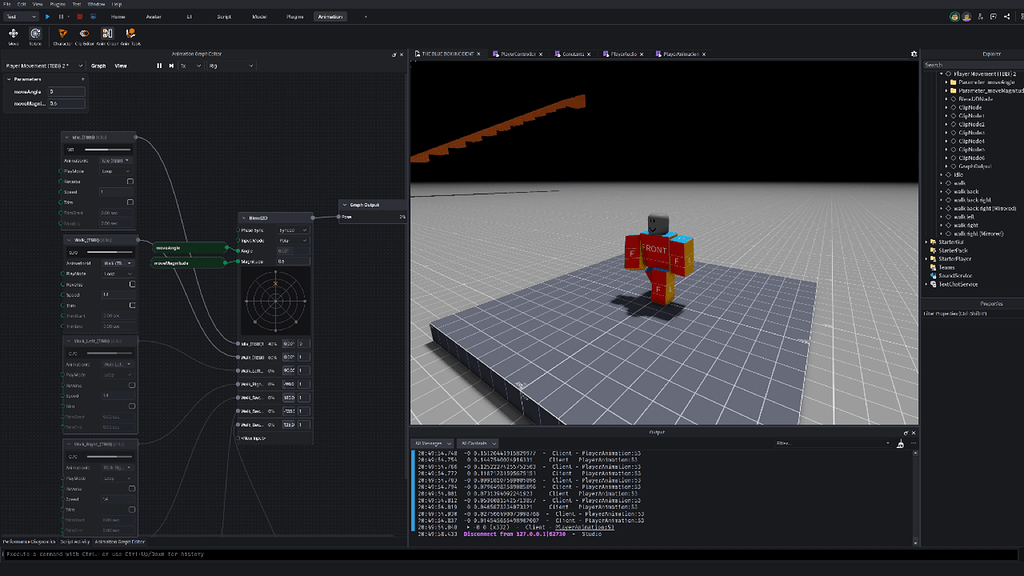
By Shivam Das. Independent creator-focused coverage. Images from Roblox Creator Hub and Roblox Developer Forum are used as workflow illustrations; older graph screenshots are identified in their captions and should not be mistaken for the October beta's exact interface.