Roblox has introduced Prompt-to-Avatar in Studio Beta, giving creators a faster way to build game characters from written descriptions. Announced on October 29, 2026, the tool lets developers describe a character, refine a 2D concept, and then generate a Roblox-ready 3D avatar through Avatar Setup. It is designed to reduce the modeling work involved in populating an experience, while leaving creators in control of the character’s look and direction.
The important distinction is that Prompt-to-Avatar is a creator workflow inside Roblox Studio, not a general-purpose button that automatically turns every player’s chat prompt into a wearable marketplace avatar. Roblox’s announcement focuses on building characters for games, and the feature remains in beta as of November 1, 2026.
What is Roblox Prompt-to-Avatar?
Prompt-to-Avatar is a Studio Beta feature that generates game-character models from text prompts. A developer describes the character they want, reviews and iterates on a 2D concept image, and then starts the 3D build. Roblox says the feature is available through Avatar Setup in Studio, through Assistant, and through Studio MCP workflows.
This approach could make a practical difference for small teams. Character creation often involves several specialist tasks, including shaping a model, preparing its body structure, setting up a rig, and checking that it works with Roblox’s avatar system. Prompt-to-Avatar is intended to automate parts of that process so developers can spend more time on the character’s role, visual identity, animation and place in the game.
How the new avatar-generation workflow works
- Enable the beta. In Roblox Studio, open File, choose Beta Features, and enable Prompt-to-Avatar when it is available for your account.
- Open Avatar Setup. Go to the Avatar ribbon, select Setup, and look for the Build Avatar (Beta) option.
- Describe the character. Enter a text prompt that explains the style, proportions, character type, clothing and key colors.
- Refine the 2D concept. Review the generated concept image. You can retry or adjust the prompt until the design is closer to what you intended.
- Build the 3D model. When the concept is ready, choose Build 3D and wait for the model to generate.
- Review the result. Inspect the generated avatar in the Avatar Setup preview before using it in your experience.
Roblox says a 3D generation can take around three to six minutes. Builds with Dynamic Heads may take longer. That is a useful planning detail for creators testing several character concepts in one session.
Clothing, heads and rig options creators can choose
The beta announcement describes several configuration choices. Creators can generate an avatar with built-in clothing or generate the body with a modesty layer. They can also choose between static and Dynamic Heads. Roblox describes Dynamic Heads as having eye sockets and a mouth cavity intended to support more expressive facial features.
For rigging, the announced options are R15 and Advanced R15. These are important compatibility details: developers should not assume the beta creates every custom rig format or supports legacy R6 characters. If a project depends on a specific rig structure, test the generated model in a copy of the experience before replacing an existing character workflow.
Important limitation: accessories are not generated yet
One of the most important caveats is easy to miss in a quick announcement summary. Roblox says avatar accessories are not generated in this beta release, even if accessories appear in the 2D concept image. The company says accessory generation is planned for the production release.
That means a concept image should be treated as a visual target, not a promise that every visible detail will be present in the final 3D output. Developers may still need to create, source or attach accessories separately. Teams should account for that extra work when estimating how much time the feature will save.
How to write better Prompt-to-Avatar prompts
Roblox recommends a structured prompt that starts with a clear visual style and body proportions, then describes the character and outfit. A useful pattern is:
Style anchor, full body, proportions, character, outfit from top to bottom, two or three main colors and one accent.
For example, a developer might describe a stylized fantasy RPG explorer, full body, adult proportions, soft rounded shapes, a coastal cartographer, a teal coat, cream trousers, brown boots and a brass compass. The point is not to copy a particular example but to give the model a consistent visual direction.
- Put the art style first. Words such as stylized fantasy, low-poly, cel-shaded or realistic influence the overall result.
- Be precise about proportions. State whether the character should look like a child, an adult, tall, compact, broad or slender where appropriate.
- Describe clothing from top to bottom. Specific garments are more useful than a vague instruction such as “cool outfit.”
- Keep the palette controlled. Two or three main colors plus one accent can produce a more coherent design.
- Avoid conflicting directions. Combining an anime style with highly realistic anatomy cues may pull the result away from the look you intended.
- Iterate before rebuilding. Roblox recommends refining the prompt and retrying when the output is not right; if a build repeatedly fails, report the issue through the official feedback route.
What early creator feedback says
The announcement thread shows why the beta label matters. Some developers welcomed the possibility of creating characters without deep modeling experience, while others questioned facial quality, hand shapes and how consistently the generator followed prompts. One staff response clarified that the current generation supports R15 and Advanced R15 rigs, rather than arbitrary custom rigs.
Those comments are early community feedback, not a formal performance benchmark. They do, however, point to the right way to evaluate the tool: test the generated model against the actual needs of your game. Check hands, facial expression, proportions, clothing boundaries, rig behavior and whether the character still looks consistent from different camera angles.
Prompt-to-Avatar and Studio MCP: what the integration means
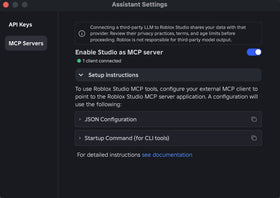
Roblox also says Prompt-to-Avatar supports Studio MCP. That gives creators using an MCP-enabled development workflow another way to access the generation process. It may be useful for teams that already use AI-assisted tools to plan characters, build scenes or manage repetitive Studio tasks.
The integration does not remove the need for review. Generated assets still need to be checked for visual quality, technical compatibility and compliance with Roblox’s policies. A faster first draft is valuable only if the team can reliably turn it into a character that works in the finished experience.
Is Prompt-to-Avatar available to every Roblox player?
No. Roblox announced Prompt-to-Avatar as a Studio Beta for creators. The documented workflow is inside Roblox Studio and related creator tools. Players who simply use the Roblox app should not assume they can access this feature from the standard avatar editor.
Availability can also change while a beta is rolling out. If the option does not appear, confirm that Studio is updated and check the Beta Features menu and Roblox’s official announcement for rollout updates.
What this could mean for Roblox game development
The biggest opportunity is not simply making characters faster. It is lowering the cost of experimentation. A developer who can produce a rough character concept in a few minutes may be more willing to test a different non-player character, create a distinctive shopkeeper for a new area, or build a cast that gives a small experience more personality.
But faster generation does not automatically create better game design. A world filled with visually polished but interchangeable characters can still feel generic. The strongest use case is likely to be a repeatable workflow in which creators use prompts to establish a starting point, then add deliberate art direction, gameplay purpose, animation and polish.
There is also a production trade-off. Since accessories are not part of this beta output, and since developers may need to retry or refine results, teams should measure the time saved on their own projects rather than assume every character can be completed in one pass.
What Roblox says is coming next
Roblox’s announcement says the company is also working on Prompt-to-Animation, improvements to Avatar Setup and further stylization work. The company has not presented those items as fully released features in this announcement. Accessory generation is also described as a future production-release capability, not something creators should expect from the current beta.
Quick answers
How do I turn on Prompt-to-Avatar in Roblox Studio?
Open File, select Beta Features, enable Prompt-to-Avatar if it is available, then open the Avatar ribbon, choose Setup and select Build Avatar (Beta).
How long does Roblox Prompt-to-Avatar take?
Roblox says a 3D build typically takes about three to six minutes. Models with Dynamic Heads may take longer.
Does Prompt-to-Avatar create accessories?
No. Roblox says accessories are not generated in this beta, even if they appear in the 2D concept image. The company says accessory generation is planned for the production release.
Which rigs does the beta support?
The announcement lists R15 and Advanced R15 rigs. Developers should not assume support for every custom rig type.
Can I use Prompt-to-Avatar through Studio MCP?
Yes. Roblox says the beta includes Studio MCP support, in addition to access through Avatar Setup and Assistant.
Is Prompt-to-Avatar a public player feature?
It is announced as a creator feature in Roblox Studio Beta, not as a general feature in the regular Roblox player app.
Official Roblox announcement and further reading
Read the official Prompt-to-Avatar announcement on the Roblox Developer Forum for the original setup walkthrough, screenshots, prompt examples and ongoing creator discussion. Roblox’s AI workflows documentation provides broader context on AI-assisted creation in Studio.
Author: Shivam Das
Reporting note: This article reflects Roblox’s official announcement and creator discussion available as of November 1, 2026. Beta features and rollout details may change.