Roblox developers have a clear migration milestone ahead: platform-integrated chat is scheduled to become the required path for custom chat in all games in May 2027. This is an architectural change, not just a new chat window: Roblox will handle message delivery and rendering, and message content will no longer be accessible to game scripts.
What the deadline means
Roblox says platform-integrated chat will be required for new and existing games starting in May 2027. Developers can still place chat inside a custom interface using TextChannelWindow, but custom interfaces cannot independently render chat transcripts from message text exposed to scripts. Games using default Roblox chat without customizations are not expected to need action.
Migration timeline
- Now through February 2027: Opt in and test the updated TextChatService; report missing capabilities.
- February 2027: Roblox plans to automatically opt new and existing games in, with an opt-out option.
- May 2027: The updated TextChatService becomes the required way to provide custom chat in new and existing games.
Roblox's October 28 update announced a developer webinar for November 3, 2026, 10–11 a.m. Pacific Time. Check the official forum post for registration and schedule changes.
API migration map
| Old implementation | Roblox's stated direction | What to do |
|---|---|---|
TextChatMessage.Text and Translation used by custom chat UI |
TextChannelWindow |
Move chat display to the native window; Roblox handles delivery and rendering. |
TextChatMessage.PrefixText |
Native role badges/prefix solution planned for early 2027 | Decouple role data from custom prefix rendering; test the native feature when released. |
Custom presets or chat wheels using TextChannel:SendAsync
|
Quick Words | Audit presets and prepare creator-defined Quick Words. |
OnIncomingMessage and Player.Chatted for commands/moderation |
TextChatCommands and read-only chat moderation |
Move supported commands to native command objects and test staff access. |
This is not a one-to-one code conversion. Roblox's native systems may not reproduce every custom workflow. Test the actual player and moderator experience before shipping.
How to test in Roblox Studio
- Create a separate test place or controlled test version; do not start with the live production place.
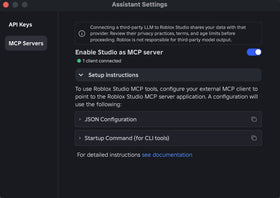
- In Studio, locate
TextChatServiceand setPlatformIntegratedChattoEnabledfor the test. - Inventory custom chat windows, channel routing, role labels, chat wheels, admin commands, message logs, moderation tools, announcements and every script that reads message text.
- Test with multiple accounts and permission levels: send/receive, reporting, muting, channel membership, read-only moderator access and late joins.
- Prototype
TextChannelWindow; verify its target channel, placement, styling and whether the default window also shows that channel. - Test long histories, mobile/console layouts, team or guild channels, and staff workflows. Record failures and report concrete feedback through Roblox's Developer Forum thread.
Audit text inputs outside chat
Roblox reiterates that player-to-player conversation must go through TextChatService. Signs, bulletin boards, pet names, license plates, trading systems, announcements, comment systems and admin modules can become unofficial chat channels if players can use them for live conversation.
For user-generated text surfaces that are not chat, Roblox says creators should apply a rate limit of at least one update per minute so they cannot be used for real-time conversation. Update, restrict or remove admin-module messaging that bypasses chat rules. A text filter alone does not make an alternative live-chat system compliant.
Developer checklist before May 2027
- Search scripts for
Player.Chatted,OnIncomingMessage,TextChatMessage.Text,Translation,PrefixTextandSendAsync. - Replace arbitrary message parsing with supported commands or explicit UI actions where possible.
- Identify staff who need read-only chat visibility and test the native moderation workflow.
- Prototype custom chat layouts with
TextChannelWindowacross devices. - Route actual player conversation through TextChatService and rate-limit non-chat UGC text surfaces.
- Track roadmap releases for role badges, Quick Words, message history, creator blocked words and the Quick Action Menu. Treat roadmap dates as targets until features ship.
Will every game need to change?
No. Roblox says games using default chat without customizations do not need to take action and should not see a change. The greatest work is likely for games with bespoke chat UIs, custom prefixes, message parsing, chat wheels, player-to-player messaging hidden in other systems, or admin tools built on old chat behavior.
Frequently asked questions
When does platform-integrated chat become mandatory?
Roblox currently states May 2027 for new and existing games.
How do I test the new system?
In a test experience, set TextChatService.PlatformIntegratedChat to Enabled in Studio.
Can I still build a custom chat UI?
Yes. Roblox documents TextChannelWindow as the native way to place chat in a custom UI. Roblox controls delivery and rendering.
What replaces custom commands?
Roblox points developers to TextChatCommands for supported command workflows. Test your own command behavior rather than assuming old hooks remain compatible.
Do default-chat games need to migrate?
Roblox says experiences using default chat without customizations do not need to take action.
Official Roblox resources
- Roblox Developer Forum: Important TextChatService Updates
- Roblox Creator Hub: Platform-integrated chat
- Roblox Creator Hub: Text chat documentation
Related Roblox coverage
Read our TextChatService update explainer and coverage of developer concerns for the broader context.
Official developer walkthroughs
Roblox included these videos in its October 2026 Developer Forum update.
By Shivam Das