Updated November 1, 2026 — Roblox has made its Studio Model Context Protocol (MCP) server more dependable for creators who work with AI coding agents and more than one open Studio session. The key change is explicit routing: every MCP tool call now identifies the Studio instance it should affect with a studio_id. Roblox also added Place ID information to the Studio list and made connected AI clients easier to inspect in Assistant Settings.
For developers, this is not simply another AI feature announcement. It addresses a practical problem in agent-assisted game development: when multiple Studio windows or AI clients are involved, an instruction must reach the intended project rather than whichever session happens to be active. The update makes that selection clearer, although it does not mean that several agents can safely edit the same project at the same time without coordination.

What changed in the Roblox Studio MCP update?
Roblox’s August 19, 2026 Developer Forum announcement describes three practical changes and two reliability fixes. First, each MCP tool call must include the target studio_id. Second, the list_roblox_studios response now includes a Place ID when the open place has one. Third, Assistant Settings can show which AI clients are connected to the Studio MCP server.
- Explicit Studio routing: agents specify the Studio instance they intend to work with on every tool call.
- Place ID visibility: creators can distinguish two open Studio windows that have similar or identical names by checking their Place IDs.
- Connected-client visibility: Assistant Settings shows connected AI clients, making it easier to diagnose a client that appears unresponsive.
- Connection reliability: Roblox fixed a case where valid tool calls could return “method not implemented” after an internal connection issue.
- Server stability: Roblox also fixed reports that the MCP server could disable itself unexpectedly.
The change replaces the older session-state approach that relied on set_active_studio. If a creator or custom agent called that tool directly, the workflow needs to be updated to pass studio_id with each request instead.
Why explicit studio_id routing matters for multi-agent workflows
Imagine a developer has a lobby project and a separate combat prototype open in Roblox Studio. A single MCP-connected AI client may need to inspect a script in one project, then check an object in the other. Before explicit routing, a shared connection could leave agents depending on session state and make it harder to know which Studio a tool call would reach.
With the updated approach, the target is part of the request itself. That makes the instruction easier to audit: the agent names the Studio instance it intends to inspect or change, rather than assuming that a previous selection is still active. It is especially useful for teams testing several experiences, creators maintaining separate development and staging places, and developers using more than one AI client.
How Place IDs help creators choose the correct Studio
Studio window names are not always enough to identify a project. A developer may open two places with similar names, duplicate a test place, or work across several places inside one experience. Roblox says list_roblox_studios now returns each connected Studio’s name and Studio instance ID, along with its Place ID when available. Local places without a Place ID are still listed by name only.
The Place ID provides another way to verify the target before an agent reads or edits the data model. It is a useful safety check, not a substitute for reviewing the request: creators should still confirm the Studio instance, place, and intended operation before approving code or asset changes.
How to check which AI clients are connected
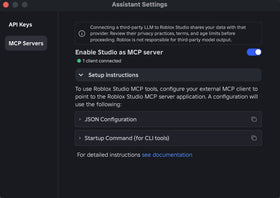
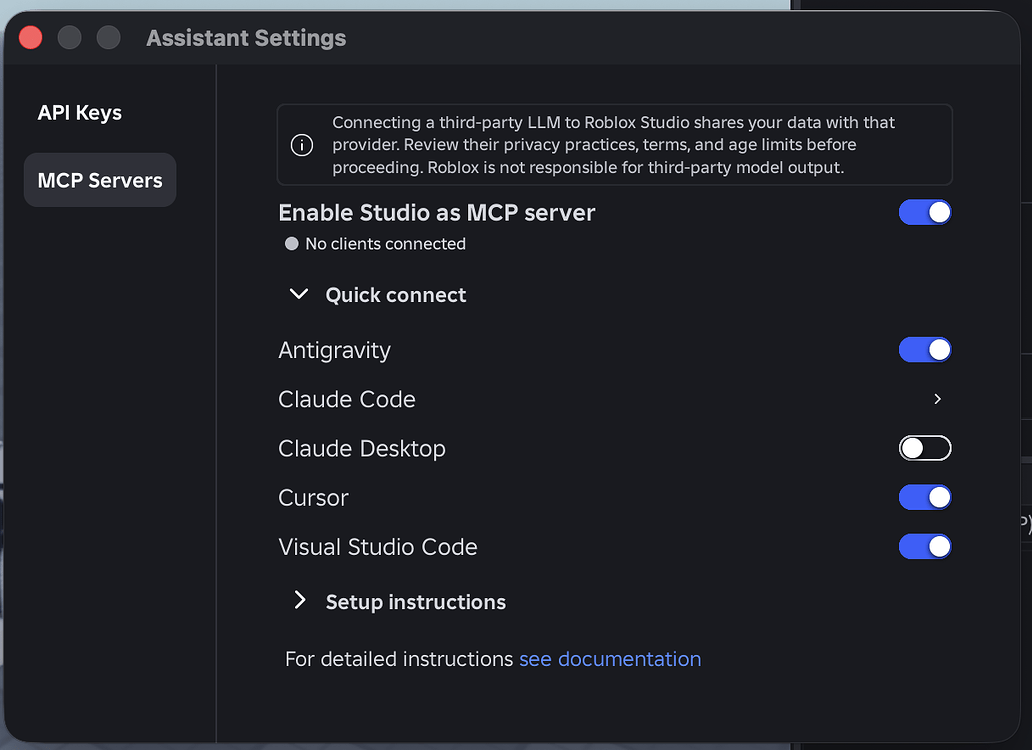
The updated Assistant Settings panel provides a quick way to see which AI clients are connected to the Studio MCP server. Roblox says creators can hover over the tooltip on the MCP Servers page to see the connected-client list. If an agent stops responding, this is a sensible first check before changing configuration or assuming the project itself is broken.
How to set up Roblox Studio MCP
The built-in MCP server runs locally with Roblox Studio and communicates with an MCP-compatible AI client. Roblox’s current Creator Hub documentation explains the connection process and lists supported clients, including Codex CLI, Claude Code, Claude Desktop, Cursor, Gemini CLI, Antigravity and Visual Studio Code.
- Update Roblox Studio and install or update the AI client you intend to use.
- Open Roblox Studio and launch the Assistant panel.
- Open the Assistant menu and choose the MCP Servers settings.
- Turn on Enable Studio as MCP server.
- Use Quick Connect for a supported client, or follow Roblox’s manual configuration instructions.
- Restart the AI client if required by its setup flow.
- Return to Assistant Settings and check for the green connected indicator.
- If more than one Studio window is open, list the connected Studios and confirm the intended Place ID before running project-changing commands.
On Windows, Roblox’s documentation gives a local MCP launcher path based on %LOCALAPPDATA%\Roblox\mcp.bat. On macOS, it documents the Studio MCP executable inside the RobloxStudio application bundle. Use the exact current instructions shown in Studio because paths and client setup can vary by operating system and client version.

What the update does not mean
Multi-agent support should not be confused with unrestricted simultaneous editing. Explicit routing makes it possible for clients to address different Studio instances through a shared MCP connection. It does not remove the normal risks of two agents changing the same scripts, objects, or project state at once. Teams should assign clear ownership, avoid overlapping edits, and review changes before publishing.
Creators should also distinguish multi-Studio support from multiple agents acting on one Studio instance. Roblox’s announcement says the routing change makes multi-Studio and multi-client workflows more reliable. It does not promise conflict-free parallel edits to the same data model. Play mode can also affect which operations are available: Roblox’s earlier guidance explains that some edit-mode operations cannot run while a Studio instance is in Play or Testing mode.
Privacy and security: check what an AI client can access
Roblox warns that connecting a third-party large language model to Studio shares data with the external provider. That matters because an agent may read scripts, properties, console output, screenshots, or other project context as part of a task. Before connecting a client, creators should review that provider’s privacy practices, terms, data-retention settings and account permissions.
Only connect clients you trust. Keep secrets, private keys, unpublished credentials and personal information out of scripts and prompts. Use least-privilege access where possible, and review generated changes before accepting them into a live experience.

What creators should do if an MCP client stops responding
Start with the connection rather than immediately changing project files. Check the green connection indicator in Assistant Settings, confirm that the intended AI client appears in the connected-client list, and verify that the client is targeting the correct studio_id. If the client was updated alongside Studio, restart it once so it can discover the latest tools.
If the server is missing or tools are unavailable, Roblox’s Creator Hub troubleshooting guidance recommends restarting both Studio and the MCP client, checking that the command or executable path is correct, and validating the client’s JSON configuration. If two projects are open, use their Place IDs to make sure the agent is addressing the intended place.
How this fits into Roblox’s wider AI development push
The MCP update is part of a broader move to make Roblox Studio work with external development tools. Roblox’s April 2026 engineering overview described agent-assisted planning, building and testing, while later Studio updates expanded the tools available through MCP. Creators interested in the asset-generation side can also read our guide to Roblox Procedural Models and code- or AI-assisted 3D creation.
The practical value of the August routing change is less about making an AI agent “smarter” and more about making its target explicit. As creators connect more tools and keep more projects open, reliable project selection becomes a basic requirement for safe automation.
Frequently asked questions
What is Roblox Studio MCP?
Roblox Studio MCP is a built-in Model Context Protocol server that lets compatible AI clients communicate with an open Studio session. Depending on the tools and permissions available, clients can inspect the data model, edit scripts, run Luau, work with assets and test gameplay.
What is the main Studio MCP multi-agent improvement?
The main change is that every MCP tool call now includes a studio_id, explicitly identifying the Studio instance it should target. This reduces reliance on session state when several Studio instances or AI clients are connected.
Did Roblox remove set_active_studio?
Yes. In the August 2026 update, Roblox said set_active_studio was removed from this routing workflow. Agents that called it directly should pass the target studio_id with each tool call instead.
Why does list_roblox_studios now show Place IDs?
Place IDs help distinguish Studio instances when multiple open places have similar names. Roblox notes that local places without a Place ID are still listed by name only.
Can multiple AI agents work with multiple Roblox Studio windows?
The update makes multi-Studio, multi-client workflows more reliable by letting tool calls identify their target Studio. It should not be interpreted as a guarantee that multiple agents can safely make conflicting edits to the same project at the same time.
Which AI clients can connect to Roblox Studio MCP?
Roblox documentation lists clients including Antigravity, Codex CLI, Claude Code, Claude Desktop, Cursor, Gemini CLI and Visual Studio Code. Quick Connect only shows clients installed on the creator’s computer.
How can I tell whether my MCP client is connected?
Open Assistant Settings, go to MCP Servers, and check the connection indicator. Roblox says the connected-client list can be viewed from the tooltip on the MCP Servers page.
Is it safe to connect a third-party AI model to Studio?
It depends on the provider and the data you allow it to access. Roblox warns that connecting a third-party model shares data with that provider. Review the provider’s privacy practices and avoid exposing secrets or sensitive project information.
Official sources and further reading
- Roblox Developer Forum: Studio MCP — Multi-Agent Improvements and Connected AI Clients.
- Roblox Creator Hub: Connect to the Roblox Studio MCP server.
- Roblox Developer Forum: Studio built-in MCP server and playtest automation.
- Roblox Newsroom: Roblox Studio is Going Agentic.
By Shivam Das